


What Is a NIC (Network Interface Card)?
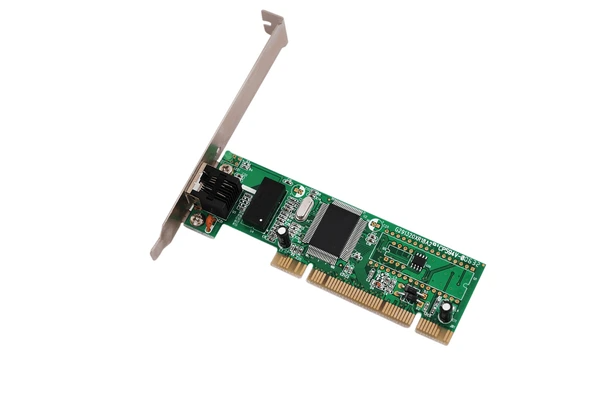
A Network Interface Card (NIC), often called a network adapter or LAN adapter, is essential hardware that enables devices to connect and communicate within a network. By providing a physical interface and managing data packet transmission using MAC addresses, a NIC serves as the bridge between a device and the network. Whether for wired or wireless connections, NICs play a critical role in ensuring seamless data exchange, making them vital for modern computing and networking. This article explores the functionality, types, and benefits of NICs, helping you understand their importance in today’s connected world.
How NICs Work in Networking
Functions of Network Interface Cards
- MAC Address Assignment: NICs assign unique Media Access Control (MAC) addresses to host devices, ensuring proper identification on the network.
- Data Relaying: They work with hubs and switches to relay data between devices using MAC addresses, ensuring accurate delivery.
- Data Reception: NICs receive incoming data streams from the network, preparing them for processing by the host system.
Architecture and Operation of NICs
- Packet Processing: Operating systems provide utilities for NICs to read incoming packets, enabling applications to process data efficiently.
- Independent Streams: Applications handle packet streams independently, which can lead to resource inefficiencies when running multiple applications.
- Efficiency via DMA: NICs use descriptor rings and Direct Memory Access (DMA) to transfer data between host and NIC memory, improving transmission and reception speeds.
Advanced Features of Modern NICs
- Smart NICs: Advanced NICs integrate processing units like ARM processors, FPGAs, or ASICs to offload data tasks from the host CPU, improving performance.
- Specialized Functions: They handle advanced tasks, including packet classification, encryption, and network virtualization, enhancing network capabilities.
- Multiple Ports: Some NICs include multiple ports, allowing connections to various network types, increasing flexibility and usability in diverse environments.
Types of NICs and Their Use Cases
Ethernet Cards
Ethernet cards are the most widely used type for wired connections and come in varying speeds to suit different needs.
- 10/100 Mbps: Older models, suitable for basic networking tasks.
- 1 Gbps: Standard for most modern desktops and servers, offering reliable performance.
- 10 Gbps: High-speed options for servers and data centers requiring faster data transfer.
- 25/40/100 Gbps: Advanced solutions for high-performance computing and large-scale data handling.
Wireless Cards
Wireless cards enable connectivity without cables, adhering to various wireless standards.
- 802.11a/b/g/n/ac: Widely used for Wi-Fi networks in homes and offices.
- 802.11ad: High-speed, short-range connections, ideal for specialized applications.
- 802.16 (WiMAX): Designed for long-range wireless broadband connectivity.
Key Use Cases
1. Servers and Data Centers
High-speed Ethernet cards (10/25/40/100 Gbps) are essential for maximizing throughput and handling demanding workloads.
2. Desktop and Workstation Computing
Most desktops and workstations rely on 1 Gbps Ethernet or 802.11ac wireless cards for day-to-day networking tasks.
3. Internet Servers
Internet-facing servers use 10 Gbps Ethernet cards to manage heavy traffic and ensure fast response times.
4. Industrial and Embedded Systems
Specialized cards like Bluetooth or Zigbee are tailored for low-power, wireless sensor networks in industrial and embedded environments.
Benefits of NICs
1. Enhanced Network Bandwidth and Performance
Network interface cards (NICs) allow devices to connect and transmit data at high speeds, supporting up to 100 Gbps in modern setups. Using multiple cards in a single system can further boost available bandwidth, improving overall performance and accommodating demanding applications.
2. Offloading Tasks to Optimize CPU Usage
Advanced cards with programmable accelerators like FPGAs can offload data packet processing tasks from the CPU. This frees up CPU resources for other applications, reduces latency, and enables advanced features like load balancing and failover support, enhancing network efficiency.
3. Increased Resiliency and Fault Tolerance
Using redundant cards ensures fault tolerance. If one card fails, traffic can be seamlessly rerouted to another, maintaining uninterrupted connectivity. Additionally, intelligent load-balancing algorithms distribute traffic evenly, optimizing network performance and reliability.
4. Customization and Programmability
Modern cards equipped with FPGAs offer programmability and customization of network functions. Features like packet filtering, load balancing, and network virtualization can be offloaded, improving efficiency. These capabilities also support advanced technologies like software-defined networking (SDN) and network function virtualization (NFV).
5. Enhanced Security and Isolation
Advanced designs with shared memory and dedicated microcontrollers provide secure communication channels, improving reliability in distributed applications. Some cards also support features like message authentication and encryption, strengthening security and safeguarding sensitive data.
To get detailed scientific explanations of Network Interface Card, try Patsnap Eureka.
