In today’s rapidly evolving digital landscape, the choice of processor can make or break the efficiency and outcome of your tasks. Central Processing Units (CPUs) and Graphics Processing Units (GPUs), the two cornerstones of computing, each possess unique performance strengths and optimal use cases. Whether it’s routine office work, complex graphic rendering, data processing, or artificial intelligence training, different workloads demand distinct processing capabilities. Understanding the intricate differences between CPU vs GPU has thus become essential for making informed decisions.
This article, CPU vs GPU: Decoding the Right Processor for Your Workload, delves deep into their architectures, performance profiles, and application scenarios through PatSnap Eureka AI Agent. By the end, you’ll be equipped with the knowledge to select the ideal processor for your specific needs, unlocking the full potential of your computing devices.

What is a CPU?
A Central Processing Unit (CPU) is the general-purpose brain of a computer. It executes instructions from software and operating systems, performing logic, arithmetic, control, and input/output tasks. CPUs are optimized for single-thread performance and can handle a broad range of tasks sequentially or in small parallel batches.
Key Characteristics of CPUs
- Versatility: CPUs handle nearly any kind of computing workload, including system control, application logic, and multitasking.
- Sequential Processing: Ideal for processes requiring order, logic, and decisions such as database management, spreadsheets, and code execution.
- Fewer, Powerful Cores: Typically contain 2 to 32 high-frequency cores. These cores feature complex control units and larger caches, allowing advanced instruction handling.
- Strong OS Integration: Controls and coordinates the system, managing memory, processes, and peripheral devices.
- Scalability Across Devices: CPUs power everything from smartphones and embedded systems to desktops and cloud servers.
What is a GPU?
A Graphics Processing Unit (GPU) is a specialized chip built for rapid, parallel execution of similar instructions across large data sets. Initially created for rendering images and graphics, modern GPUs are extensively used for compute-intensive applications like AI training, simulations, and scientific calculations.
Key Characteristics of GPUs
- Massive Parallelism: A GPU can contain thousands of lightweight cores, which execute the same instructions simultaneously across multiple data points.
- Optimized for Throughput: Excels at vector and matrix operations found in graphics rendering and machine learning tasks.
- Graphics and Compute: Still crucial for graphical workloads like 3D modeling and real-time video rendering, while enabling new roles in deep learning.
- Wide Framework Support: Compatible with ML frameworks like TensorFlow, PyTorch, and Keras. NVIDIA’s CUDA enables low-level access to GPU hardware.
- Cloud and Consumer Access: Available in everything from gaming PCs to supercomputers and cloud environments like AWS or Google Cloud.
Pros and Cons of CPUs
Pros
- Highly Flexible: Adaptable to a wide array of tasks, from web browsing to data analysis.
- Fast Instruction Execution: Handles branching, recursion, and logical dependencies efficiently.
- Rich Software Support: Supported by every modern operating system and most programming languages.
Cons
- Lower Parallelism: Limited core count makes them less efficient for tasks like image processing or deep learning.
- Slower for AI Training: Struggles with high-throughput operations like matrix multiplications in neural networks.
- Thermal and Performance Limits: Scaling performance often leads to heat and energy challenges.
Pros and Cons of GPUs
Pros
- Unmatched Parallel Computing: Ideal for handling repetitive tasks across massive data sets, such as in ML training.
- High Floating Point Performance: Delivers teraflops of compute power, critical for graphics and AI.
- Tooling and Ecosystem: CUDA, cuDNN, and other tools accelerate development and deployment.
Cons
- Power Demands: High-performance GPUs can draw hundreds of watts, demanding better cooling and power supply.
- Limited Control Logic: Inefficient for tasks that require complex decision trees or instruction dependencies.
- Steeper Learning Curve: Requires understanding parallel programming, memory hierarchy, and sometimes proprietary APIs.
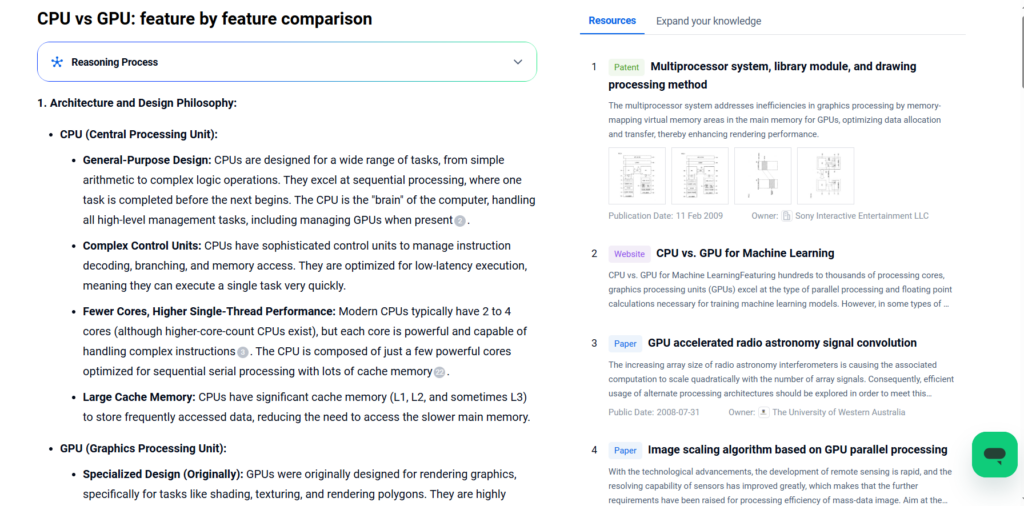
CPU vs GPU: Feature-by-Feature Comparison
1. Architecture and Design Philosophy:
CPU (Central Processing Unit):
- General-Purpose Design: CPUs are designed for a wide range of tasks, from simple arithmetic to complex logic operations. They excel at sequential processing, where one task is completed before the next begins. The CPU is the “brain” of the computer, handling all high-level management tasks, including managing GPUs when present.
- Complex Control Units: CPUs have sophisticated control units to manage instruction decoding, branching, and memory access. They are optimized for low-latency execution, meaning they can execute a single task very quickly.
- Fewer Cores, Higher Single-Thread Performance: Modern CPUs typically have 2 to 4 cores (although higher-core-count CPUs exist), but each core is powerful and capable of handling complex instructions. The CPU is composed of just a few powerful cores optimized for sequential serial processing with lots of cache memory.
- Large Cache Memory: CPUs have significant cache memory (L1, L2, and sometimes L3) to store frequently accessed data, reducing the need to access the slower main memory.
GPU (Graphics Processing Unit):
- Specialized Design (Originally): GPUs were originally designed for rendering graphics, specifically for tasks like shading, texturing, and rendering polygons. They are highly parallel, with hundreds to thousands of smaller, simpler cores.
- Massive Parallelism: GPUs are designed for parallel processing, capable of executing thousands of operations simultaneously. This makes them ideal for tasks that can be broken down into many smaller, independent calculations.
- Simplified Control Units: GPUs have less complex control units compared to CPUs, as they are optimized for throughput rather than latency.
- Many Cores, Lower Single-Thread Performance: GPUs have hundreds or even thousands of cores, but each core is less powerful than a CPU core. The GPU has a massively parallel architecture consisting of hundreds of smaller, less powerful cores that are more efficient cores designed for handling multiple tasks simultaneously.
- Higher Memory Bandwidth: GPUs typically have higher memory bandwidth than CPUs, meaning they can read and write data to memory much faster. GPUs provide higher aggregate memory bandwidth, while CPUs feature more sophisticated instruction processing and faster clock speed.
2. Core Count and Thread Execution:
- CPU:
- Few Cores, Few Threads: CPUs have a small number of cores (2-4 for consumer-grade, up to 64 for high-end server CPUs). Each core can execute one thread at a time.
- Hyper-Threading/SMT (Simultaneous Multi-Threading): Some CPUs support hyper-threading, which allows each core to execute two threads simultaneously, improving utilization.
- GPU:
- Many Cores, Many Threads: GPUs have hundreds or thousands of cores. For example, a modern GPU can have up to 160 thread processors. Each core can execute many threads simultaneously.
- SIMD (Single Instruction, Multiple Data) Execution: GPUs use a SIMD architecture, where multiple cores execute the same instruction on different data simultaneously. This is well-suited for data-parallel tasks.
- Thousands of Threads: GPUs can execute thousands of threads concurrently. The number and type of computational units are the main differentiators between a GPU and a CPU.
3. Clock Speed:
- CPU:
- High Clock Speed: CPUs typically have higher clock speeds (measured in GHz) compared to GPUs. For example, a typical consumer CPU might have a clock speed of 3-4 GHz.
- GPU:
- Lower Clock Speed: GPUs have lower clock speeds (measured in MHz) compared to CPUs. A typical GPU might have a clock speed of 1-2 GHz. The GPU core can perform only 1 operation, such as 64-bit doubles or 32-64 bit pixels, but can have hundreds of cores per card.
4. Cache Memory:
- CPU:
- Large Cache: CPUs have significant cache memory (L1, L2, and L3) to store frequently accessed data, reducing the need to access the slower main memory. The CPU has a very large local cache, which allows it to handle a large number of linear instructions.
- GPU:
- Smaller Cache: GPUs have smaller caches compared to CPUs. They rely more on their high memory bandwidth to access data directly from the main memory.
5. Memory:
- CPU:
- Lower Memory Bandwidth: CPUs have lower memory bandwidth compared to GPUs.
- GPU:
- Higher Memory Bandwidth: GPUs have significantly higher memory bandwidth than CPUs, allowing them to read and write data to memory much faster. GPUs support high-speed GDDR5 or GDDR6, which have higher bandwidth than CPU memory. The bandwidth between the GPU’s device memory and host memory is relatively low.
6. Power Consumption and Heat:
- CPU:
- Moderate Power Consumption: CPUs consume a moderate amount of power, depending on their clock speed and core count.
- GPU:
- Higher Power Consumption: GPUs consume more power than CPUs, especially high-end GPUs, due to their large number of cores and high memory bandwidth. They also require better cooling systems to maintain stable temperatures.
7. Cost:
- CPU:
- Wide Price Range: CPUs come in a wide price range, from budget models to high-end server CPUs.
- GPU:
- Higher Cost: GPUs are generally more expensive than CPUs, especially high-end models designed for gaming or professional applications. A single GPU can be more expensive than a CPU.
8. Typical Applications:
- CPU:
- General-Purpose Computing: CPUs are used for a wide range of tasks, including operating system functions, running applications, and performing calculations.
- Serial Tasks: CPUs excel at tasks that require sequential processing, such as running a database server or executing a complex algorithm with many branches.
- GPU:
- Parallel Tasks: GPUs are ideal for tasks that can be broken down into many smaller, independent calculations, such as rendering graphics, simulating physical systems, and training machine learning models.
- Graphics Rendering: GPUs are specifically designed for rendering graphics, including 3D rendering and video playback.
- Scientific Computing: GPUs are used in scientific computing for tasks such as molecular dynamics simulations, climate modeling, and financial modeling.
- Machine Learning: GPUs are widely used in machine learning for training neural networks, due to their ability to perform many calculations in parallel. GPUs are more popular for machine learning projects, but increased demand can lead to increased costs.
Innovation in CPU Technology
CPUs continue to evolve with several cutting-edge innovations:
- Heterogeneous Core Architectures: Designs like Intel’s Alder Lake feature performance (P) and efficiency (E) cores for dynamic task optimization.
- Integrated AI Instructions: CPUs now include AI-enhancing instructions (e.g., Intel AVX-512, DL Boost) to accelerate inference workloads.
- Advanced Packaging: Chiplet-based designs improve scalability and reduce manufacturing complexity.
- Smaller Process Nodes: Transition to 5nm and beyond improves performance-per-watt ratios.
Innovation in GPU Technology
GPU technology has rapidly evolved to meet the demands of advanced computing:
- Tensor Cores: Introduced by NVIDIA, Tensor Cores are specialized units for deep learning, accelerating matrix operations vital to AI.
- Multi-Instance GPUs (MIG): Allow partitioning a single GPU into multiple instances, enhancing utilization in multi-tenant environments.
- Ray Tracing Cores: Revolutionize real-time graphics rendering by simulating light paths more accurately, now common in RTX GPUs.
- Memory Bandwidth Boost: GDDR6X and HBM2e provide ultra-high memory bandwidth, minimizing latency in data-heavy tasks.
- Dynamic Parallelism: Enables kernels to launch other kernels, allowing more adaptive and hierarchical parallel processing.
Which Processor Is Right for You?
Choose CPUs if:
- You run operating systems, office applications, or web servers.
- Your tasks include conditional logic, branching, and dynamic instruction handling.
- You want universal compatibility and established toolchains.
Choose GPUs if:
- Your work involves AI model training, simulation, or real-time rendering.
- You need fast matrix computation, parallel video decoding, or game acceleration.
- You can take advantage of CUDA, TensorRT, or GPU clusters.
PatSnap Eureka AI Agent Capabilities
PatSnap Eureka AI Agent empowers engineers and strategists with:
- Patent Intelligence: Identify emerging players and dominant IP holders in processor tech.
- Competitive Benchmarking: Compare instruction sets, cache hierarchies, and core structures.
- Architecture Mapping: Link processor evolution to real-world application trends.
- Forecasting: Predict the next big leap in compute performance and energy design.
Conclusion
CPUs and GPUs serve different but increasingly complementary roles. CPUs excel at general-purpose, logic-based processing, while GPUs dominate in parallel workloads such as machine learning and rendering. Choosing the right processor—or integrating both—depends on workload characteristics, energy constraints, and performance goals. With PatSnap Eureka AI Agent, you can make smarter, more strategic hardware choices backed by real-time innovation and IP insights.
FAQs
No. While GPUs are powerful, they lack the versatility and OS-level capabilities of CPUs.
Yes. Most modern systems use CPUs for control logic and GPUs for parallel tasks like AI inference.
The GPU handles most of the graphics workload, but a strong CPU is also essential for smooth gameplay.
Not for all tasks. CPUs are faster for logic-based, sequential workloads; GPUs excel in parallel tasks.
Absolutely. CPUs handle orchestration, data preprocessing, and system-level operations critical to any AI deployment.
To get more scientific explanations of CPU vs GPU, try PatSnap Eureka AI Agent.