


When upgrading your computer or server, choosing the right storage solution is crucial for speed, efficiency, and overall performance. Among the most popular choices today are NVMe (Non-Volatile Memory Express) drives and SSD (Solid State Drives). Both offer faster speeds and greater reliability than traditional hard drives, but there are key differences that could influence your decision. In this article, we’ll dive into the key characteristics, benefits, performance, and use cases of NVMe vs. SSD drives to help you make an informed choice.
What is an SSD?
Solid State Drives (SSDs) have been a game-changer in the storage industry. Unlike traditional Hard Disk Drives (HDDs) that use spinning disks to store data, SSDs store data in flash memory. This provides significantly faster read/write speeds, reduced latency, and better durability.
- Technology: Flash memory (NAND)
- Form Factor: 2.5-inch, mSATA, m.2, U.2, PCIe
- Speed: Typically ranges from 500 MB/s to 5500 MB/s depending on the interface
- Price: Relatively affordable, but varies with capacity and interface
SSDs are known for being faster and more reliable than HDDs, making them ideal for general computing, gaming, and tasks requiring quick data access.
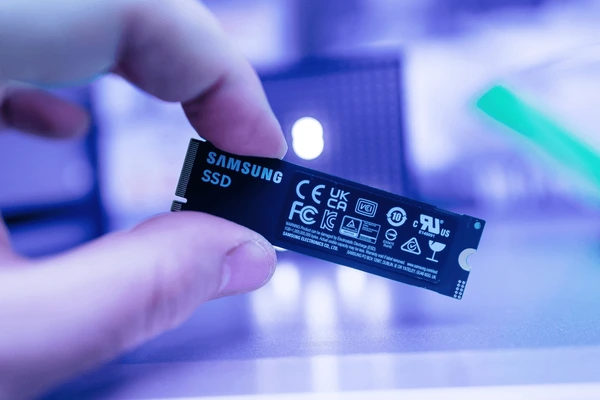
What is NVMe?
NVMe (Non-Volatile Memory Express) is a newer interface designed to work with SSD storage. It provides a high-speed connection between the storage and the motherboard via PCIe (Peripheral Component Interconnect Express) lanes. NVMe drives are designed to take full advantage of the potential of NAND flash memory and PCIe lanes, offering faster speeds than traditional SATA-based SSDs.
- Technology: Flash memory (NAND) + PCIe interface
- Form Factor: M.2, U.2, PCIe add-in cards
- Speed: Ranges from 1,500 MB/s to 7,000 MB/s (or more with PCIe Gen 4.0/5.0)
- Price: Typically more expensive than SATA SSDs due to advanced technology
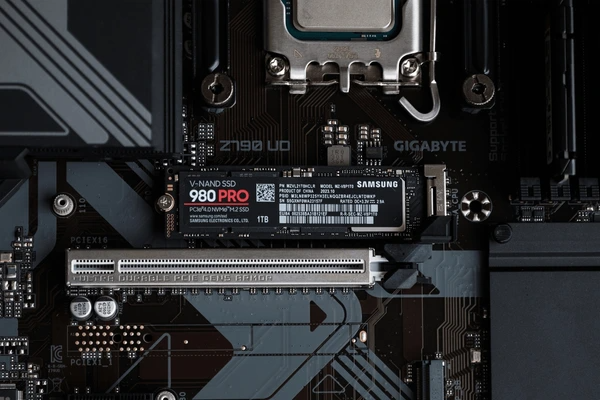
NVMe drives use PCIe lanes to directly connect to the motherboard, bypassing the limitations of SATA, which can significantly boost performance.
Key Differences Between NVMe and SSD
| Feature | SSD | NVMe |
|---|---|---|
| Interface | SATA or PCIe | PCIe (often Gen 3.0 or 4.0) |
| Speed | Up to 550 MB/s (SATA SSD) | Up to 7,000 MB/s or more (PCIe 4.0/5.0) |
| Form Factor | 2.5-inch, mSATA, m.2 | M.2, U.2, PCIe add-in cards |
| Latency | Higher compared to NVMe | Lower latency with PCIe connection |
| Power Consumption | Higher than NVMe | Lower power consumption |
| Cost | More affordable | More expensive |
| Ideal Use Case | General use, mainstream gaming, budget builds | High-performance computing, gaming, video editing, and server applications |
Performance Comparison: NVMe vs. SSD
Speed and Latency
- SSDs use the SATA interface to communicate with the motherboard, which has a maximum theoretical bandwidth of around 600 MB/s. While this is still significantly faster than HDDs (which max out at 100 MB/s), it doesn’t fully utilize the capabilities of NAND flash memory.
- NVMe, on the other hand, operates over the PCIe interface, which has much higher bandwidth, allowing for much faster read/write speeds. PCIe Gen 3 supports speeds up to 3,500 MB/s, while PCIe Gen 4 can reach up to 7,000 MB/s, making it ideal for users who need extreme performance.
Data Transfer and Throughput
- NVMe achieves significantly faster throughput by using more PCIe lanes (often 4 lanes in Gen 3, and up to 16 lanes in Gen 4/5). This enables it to transfer data quickly, making it especially effective in video editing, 3D rendering, and game loading times.
- SATA-based SSDs, while still fast, cannot take full advantage of these PCIe lanes. Therefore, they offer lower throughput compared to NVMe drives. This makes SSDs suitable for general computing tasks like web browsing, document editing, and some moderate gaming.
Heat and Power Efficiency
- NVMe SSDs are more power-efficient compared to SSDs with SATA interfaces, despite their higher speeds. They also generate less heat, which helps maintain the longevity of your components, especially in a compact setup like a laptop or a custom gaming PC.
- SATA SSDs tend to consume more power in comparison due to their older technology and slower data transfer speeds.
Use Cases: When to Choose NVMe or SSD
When to Choose an SSD
- Budget Builds: If you’re on a budget but want faster boot times and general improvements in system performance compared to an HDD, a SATA SSD is a solid choice. It delivers excellent value for money while significantly outperforming traditional hard drives.
- Mainstream Computing: For general tasks like browsing, office work, and light gaming, a SATA SSD will provide ample performance.
- Upgrades for Older Systems: If you have a system with limited compatibility (e.g., older motherboards) or don’t need ultra-fast speeds, an SATA SSD provides a cost-effective upgrade option.
When to Choose an NVMe
- Gaming Enthusiasts: For high-end gaming, NVMe SSDs are ideal due to their faster load times and the ability to handle large game files with ease. Games like Call of Duty or Cyberpunk 2077 benefit from NVMe’s fast data read speeds for smooth gameplay.
- Professional Content Creators: If you work with video editing, 3D rendering, or data-heavy applications, the speed of NVMe makes it indispensable for reducing wait times and increasing productivity.
- Servers and Workstations: For environments requiring high throughput and low latency, such as data centers, NVMe drives offer exceptional performance, making them ideal for tasks such as database management, cloud computing, and AI workloads.
Whether you’re looking to upgrade your PC or improve your gaming setup, Eureka Seek’s real-time analysis and user-friendly interface make it easier to select the perfect storage solution based on your exact requirements.

Application Cases
| Product/Project | Technical Outcomes | Application Scenarios |
|---|---|---|
| NVMe Node Management Western Digital Technologies, Inc. | Programmable switches and network controller enable hot-plugging and hot-unplugging of NVMe nodes, ensuring uninterrupted operations and improved performance. | Dynamic memory access and fault tolerance in data centers. |
| NVMe-oF SSD Enclosure Optimization Dell Products LP | Employing Controller Memory Buffers in NVMe SSDs to manage data flows, mitigating bandwidth bottlenecks and performance degradation. | Improving network performance and reducing resource utilization in NVMe-oF JBOF enclosures. |
| SSD Latency Reduction Samsung Electronics Co., Ltd. | Eliminating internal buffers and using Host Memory Buffer for direct data transfer, reducing latency and power consumption. | Addressing inefficiencies and lowering costs in SSD designs while maintaining performance. |
| Storage Load Balancing International Business Machines Corp. | Rebalancing I/O queues across CPU cores, optimizing resource allocation and reducing queue overlap. | Improving throughput and latency in NVMe storage systems. |
| PCIe SSDs Integrated Device Technology | Leveraging the PCI Express interface to overcome the performance bottleneck in traditional SSD host interfaces. | High-performance storage solutions for applications requiring fast data transfer rates. |
Price-to-Performance Considerations
- SSDs offer great performance at a lower cost compared to NVMe drives. If you’re on a budget or don’t require cutting-edge performance, SATA SSDs are a fantastic solution.
- NVMe SSDs come at a premium, but for users who need top-tier performance—especially in fields like gaming, video editing, or professional applications—the investment is well worth it.
Price Comparison
- SATA SSD: ~$50 – $100 for 500GB to 1TB
- NVMe SSD: ~$100 – $200 for 500GB to 1TB
Final Thoughts: NVMe vs. SSD
Both NVMe and SATA SSDs provide significant performance improvements over traditional HDDs. The choice between the two depends on your use case, budget, and performance requirements.
- SATA SSDs are perfect for those on a budget looking for fast performance for general computing and moderate gaming.
- NVMe SSDs are the best choice for high-performance users, including gamers, content creators, and professionals who require top-tier read/write speeds and low latency for demanding applications.
Consider what matters most to you—whether it’s affordability, speed, or future-proofing—when deciding between these two storage options.
FAQs
1. Is NVMe much faster than an SSD?
Yes, NVMe is significantly faster than SATA SSDs because it uses PCIe lanes, offering higher bandwidth and lower latency.
2. Can I replace my SSD with NVMe?
If your motherboard supports NVMe (via M.2 or PCIe slots), you can easily replace your SATA SSD with an NVMe drive for improved speed.
3. Should I buy NVMe for gaming?
Yes, NVMe offers faster load times and improved performance in modern games that require large data files and quick asset streaming.
4. How much more expensive is NVMe compared to SSD?
NVMe drives are typically more expensive than SATA SSDs, but they provide much higher performance for demanding tasks.
5. Can NVMe be used for general computing?
Yes, NVMe is overkill for basic computing tasks, but it will significantly speed up your system, especially if
To get detailed scientific explanations of NVMe vs. SSD, try Patsnap Eureka.
