


When it comes to Virtual Reality (VR) headsets, the Oculus and Meta Quest brands are often at the top of the list. Oculus, once a pioneer in the VR space, has now been rebranded as Meta Quest after Facebook’s rebranding to Meta in 2021. Despite this name change, the core technology and product offerings have remained closely related. However, there are still significant differences in terms of hardware, software, and overall user experience. This article will break down the key distinctions between Oculus and Meta Quest, helping you decide which VR headset is best for your needs.
Oculus Overview
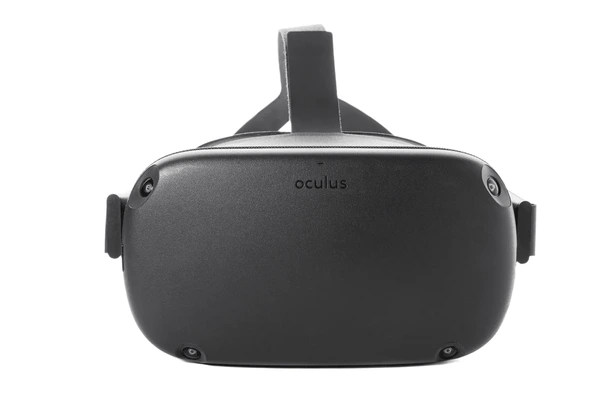
The Oculus brand first emerged with the Oculus Rift, a wired VR headset designed to deliver an immersive virtual experience. As the Oculus brand evolved, it expanded into more affordable and standalone VR options, eventually leading to the creation of the Oculus Quest series. The Oculus Quest 2, released in 2020, became one of the most popular VR headsets due to its affordability and solid performance.
Key Features of Oculus Headsets
- Standalone Performance: The Oculus Quest 2 operates independently, so it doesn’t need a PC or external sensors.
- Wide Game Library: Oculus headsets give access to a vast VR content library, including games, fitness apps, and experiences from the Oculus Store.
- Affordable: The Oculus Quest 2 offers a more affordable price compared to many PC VR headsets, without sacrificing VR performance.
- User-Friendly Interface: The Oculus app and simple menu systems make it easy for newcomers to dive into VR gaming.
Meta Quest Overview
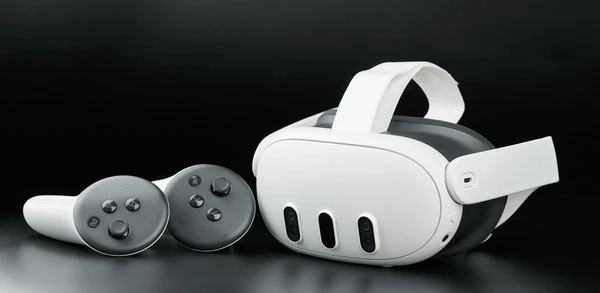
In 2021, Facebook rebranded itself as Meta and shifted its focus toward the Metaverse, a virtual world that combines various aspects of digital and physical spaces. As part of this shift, Oculus products became part of the Meta Quest line. The Meta Quest branding represents the future direction of VR under Meta’s umbrella, with the Meta Quest 2 and Meta Quest Pro headsets leading the charge.
Key Features of Meta Quest Headsets
- Meta Ecosystem Integration: Meta Quest headsets integrate seamlessly with Meta’s Metaverse vision. Users can join social experiences, virtual meetings, and enjoy entertainment options.
- High-Performance Hardware: The Meta Quest Pro delivers advanced features like mixed reality, improved eye-tracking, and upgraded hardware compared to earlier models.
- Immersive Social Experiences: Meta Quest focuses on social VR with features like Meta Horizon Worlds. Users can interact with friends and explore immersive digital environments.
- Next-Gen VR Technology: Meta Quest devices push VR technology forward, offering features like hand tracking, mixed reality, and enhanced visual fidelity.
Key Differences Between Oculus and Meta Quest
| Feature | Oculus Headsets | Meta Quest Headsets |
|---|---|---|
| Brand Name | Oculus (rebranded to Meta Quest in 2021) | Meta Quest (new branding under Meta) |
| Standalone Performance | Oculus Quest 2 (Standalone) | Meta Quest 2, Meta Quest Pro (Standalone + Mixed Reality) |
| Ecosystem | Oculus Store (VR games, apps, etc.) | Meta Horizon Worlds, Integration with Meta Metaverse |
| Target Audience | Gamers, VR enthusiasts | Gamers, social VR users, professionals in virtual spaces |
| Hardware | Moderate performance, solid gaming experience | Higher performance, professional and immersive VR |
| Price Range | Affordable, budget-friendly options | Premium options for higher-end performance, with the Quest Pro being more expensive |
| Content Library | Large, established VR content library | Expanding content library with a focus on social and professional experiences |
Performance Comparison: Oculus vs. Meta Quest
Oculus Quest 2:
- Display: 1832 x 1920 resolution per eye, 120 Hz refresh rate.
- Processor: Qualcomm Snapdragon XR2 chipset.
- Memory: 6 GB RAM.
- Storage: Available in 64 GB, 128 GB, and 256 GB variants.
- Battery Life: 2–3 hours of gameplay.
The Oculus Quest 2 delivers an exceptional VR experience for most users, providing standalone functionality and easy-to-use interface. While it’s not as powerful as PC-connected headsets, it offers excellent performance in 4K gaming, fitness applications, and social VR experiences.

Meta Quest Pro:
- Display: 1800 x 1920 resolution per eye, 90 Hz refresh rate.
- Processor: Qualcomm Snapdragon XR2+ chipset.
- Memory: 12 GB RAM.
- Storage: 256 GB.
- Battery Life: 1–2 hours with intensive use.
- Advanced Features: Eye-tracking, facial expressions tracking, mixed reality, and high-quality color passthrough for a more immersive experience.
The Meta Quest Pro is a step up in terms of performance and design, especially for those who want to experience mixed reality (MR) or use VR for professional tasks like meetings, presentations, or virtual design work. The higher-end hardware makes it a great choice for those looking for future-proof VR technology.
Software Ecosystem: Oculus vs. Meta Quest
- Oculus Store: The Oculus Store features a wide range of VR games, apps, and experiences. Popular titles include Beat Saber, Superhot VR, and The Walking Dead: Saints & Sinners. The library is constantly growing, with a strong focus on gaming content.
- Meta Horizon Worlds: With the transition to Meta Quest, Meta Horizon Worlds has become a key part of the ecosystem. It offers social and interactive experiences in a virtual space. Meta aims to combine social media, gaming, and entertainment into one platform, creating a virtual world for users to explore, chat, and interact.
Meta Horizon Worlds highlights Meta’s long-term vision of the metaverse. Meanwhile, Oculus continues to focus on delivering immersive experiences, primarily for gaming.
Which VR Headset Should You Choose: Oculus vs. Meta Quest?
The decision between Oculus and Meta Quest largely depends on your use case and budget:
- Choose Oculus (Quest 2) if:
- You’re looking for a budget-friendly, high-quality VR experience.
- You primarily want to use it for gaming and other entertainment purposes.
- You don’t need the latest mixed reality features or professional VR tools.
- Choose Meta Quest (Quest Pro) if:
- You want to experience mixed reality, advanced social VR experiences, and professional virtual spaces.
- You’re willing to invest in the cutting-edge technology of VR and the metaverse.
- You plan to use the headset for both entertainment and professional applications (like virtual meetings, workspaces, and design).
Final Thoughts
Both Oculus and Meta Quest headsets provide exceptional VR experiences, but they cater to slightly different audiences. The Oculus Quest 2 is perfect for casual gamers and those looking for an affordable, standalone VR headset. The Meta Quest Pro, on the other hand, is ideal for users seeking a more immersive experience that integrates into the Meta Metaverse and supports professional applications.
FAQs
1. What is the difference between Oculus and Meta Quest?
Meta Quest is the rebranded name for Oculus devices under Meta’s new corporate vision, focusing on the metaverse and social VR.
2. Is the Meta Quest Pro worth the extra cost over the Oculus Quest 2?
Yes, if you’re looking for advanced features like mixed reality, eye-tracking, and professional applications, the Meta Quest Pro is worth the higher cost.
3. Can you play PC VR games with Meta Quest headsets?
Yes, Meta Quest headsets can connect to a PC via Oculus Link to play PC VR games.
To get detailed scientific explanations of Oculus vs. Meta Quest, try Patsnap Eureka.
