


What Is a CMOS Battery?
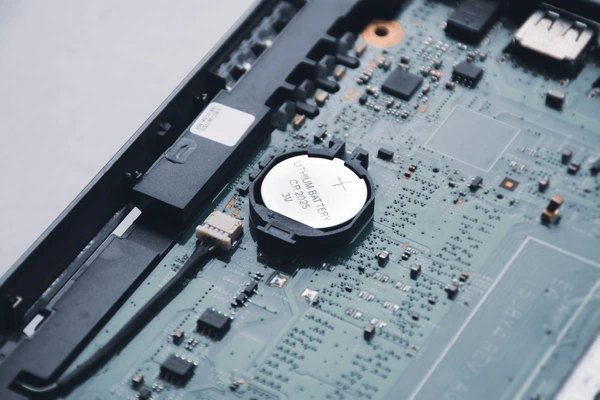
A CMOS battery, also known as a CMOS battery or RTC battery, is a small battery located on a computer’s motherboard that provides power to the complementary metal-oxide-semiconductor (CMOS) chip when the computer is turned off or in a low-power state. The primary function of the CMOS battery is to maintain the settings and data stored in the CMOS chip, which includes information such as the system date and time, hardware configuration, and other settings that are retained even when the computer is powered down.
What Does a CMOS Battery Do?
- Power Supply: The CMOS battery provides a steady power supply to the CMOS chip, allowing it to retain data and settings even when the computer is turned off. This is crucial for maintaining system configuration information that is essential for the computer’s operation.
- Data Preservation: By keeping the CMOS chip powered, the battery ensures that data such as the system time, BIOS settings, and other parameters are preserved. This is particularly important for the real-time clock (RTC) function, which tracks time even when the computer is powered down.
- Low Power Consumption: CMOS batteries are designed to consume very little power, as they need to operate for extended periods without being recharged. Typically, they are non-rechargeable and have a lifespan of around 3 to 5 years, depending on the type and quality of the battery.
- Small Size: Due to the limited power requirements, CMOS batteries are very small, usually in the form of a coin cell battery. This allows them to be integrated into the motherboard without taking up too much space.
- Essential for System Settings: While the CMOS battery is not essential for the computer’s overall operation, it is crucial for maintaining system settings and data integrity. If the CMOS battery fails, the computer may lose its settings, and the RTC may stop functioning, requiring manual reconfiguration.
Lifespan
The lifespan of a CMOS battery typically ranges from one to two years, depending on the usage and quality of the battery. In the past, CMOS batteries were rechargeable, but modern ones are usually non-rechargeable due to advancements in technology. The battery’s capacity to hold a charge decreases over time, and it needs to be replaced periodically to avoid issues related to power loss.
Signs of a Failing CMOS Battery
- BIOS Settings Loss: If the battery is dead, the BIOS settings may not be retained, leading to the need to re-enter settings every time the computer is powered on.
- Timekeeping Issues: The real-time clock (RTC) may stop functioning correctly, requiring manual time setting.
- System Errors: The computer may display errors or behave abnormally due to missing configuration data.
- Slow Performance: In some cases, a low battery voltage can cause the system to run slowly.
How to Replace a CMOS Battery
- Shut Down the Computer: Ensure the computer is powered off and unplugged.
- Open the Case: Remove the side panel of the computer case to access the motherboard.
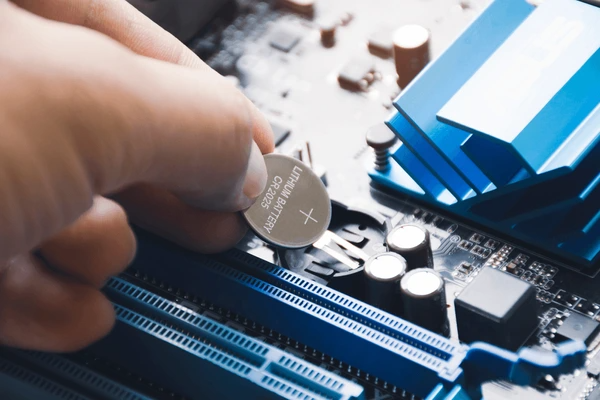
- Locate the Battery: Find the CMOS battery, which is usually a small coin-shaped cell located near the motherboard’s edge.
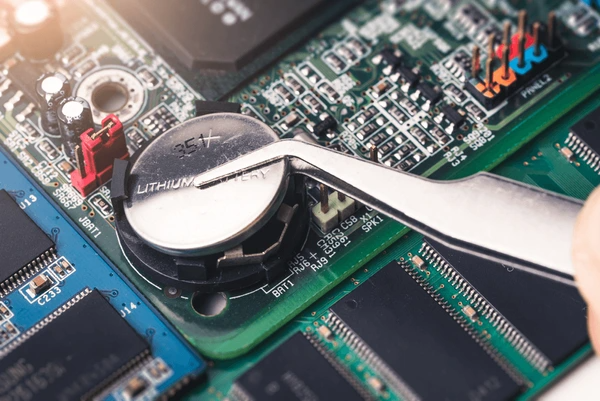
- Remove the Old Battery: Carefully disconnect the old battery from the motherboard.
- Install the New Battery: Insert the new CMOS battery into the same connector, ensuring it is securely seated.
- Close the Case: Reassemble the computer case and plug in the power cord.
Common Types
- Lithium Coin Cells: Commonly used due to their long lifespan and reliability.
- Rechargeable Batteries: Older models that can be charged when the computer is powered on.
- Solid-State Batteries: Emerging technology that offers improved performance and safety.
Troubleshooting CMOS Battery Issues
- Check the Battery Voltage: Use a multimeter to measure the voltage of the CMOS battery. It should be around 3V when fully charged.
- Replace the Battery: If the voltage is low, replace the CMOS battery with a new one.
- Reset BIOS Settings: After replacing the battery, enter the BIOS setup and reset all settings to default.
- Update BIOS: Ensure your BIOS is up-to-date, as newer versions may have improved power management for the CMOS chip.
Applications of CMOS Batteries
Digital Circuits
- CMOS technology is widely used in digital circuits due to its low power consumption and high integration capability. The CMOS gate (such as NOT, OR, AND, NOR, OR, NAND, XOR, and others) forms the basis for various digital logic implementations, enabling the creation of complex digital systems.
Analog Circuits
- In analog circuits, CMOS technology is fundamental. Although various types of devices like DMOS and BJT exist, CMOS remains indispensable. It is often used in constructing the core components of analog circuits, including operational amplifiers, filters, and other signal processing units.
Mixed-Signal Circuits
- CMOS technology excels in mixed-signal applications, where both analog and digital circuits coexist. Its ability to integrate both types of circuits efficiently makes it suitable for applications requiring a blend of analog and digital functionality.
BCD (Bipolar-CMOS-DMOS) Process
- The BCD process integrates CMOS, BJT (Bipolar Junction Transistor), and DMOS (Depletion Mode MOSFET) technologies into a single fabrication process. This integration is crucial for applications requiring a combination of these device types, such as in complex analog and mixed-signal circuits.
Standard Reference Circuits
- CMOS technology is used in constructing standard reference circuits, Low-Dropout Regulators (LDOs), and overvoltage protection circuits, which are essential in many electronic systems.
Latest Technical Innovations in CMOS Battery
- Enhanced Energy Efficiency: CMOS battery technology has seen advancements in reducing power consumption, allowing for more efficient energy use. This is achieved by optimizing the design of the complementary metal-oxide-semiconductor (CMOS) components, which only consume energy when there is a change in the input signal.
- Improved Power Density: Innovations have led to increased power density, meaning more power can be stored in a smaller space. This is crucial for portable electronics and other devices where space is limited.
- Increased Reliability: Recent advancements have focused on enhancing the reliability of CMOS batteries. This includes improving the durability and longevity of the batteries, as well as their ability to function in various environmental conditions.
- Advanced Manufacturing Techniques: There have been improvements in the manufacturing processes for CMOS batteries, allowing for more precise and efficient production. This includes advancements in materials science and semiconductor fabrication techniques.
- Integration with Other Technologies: CMOS battery technology has been integrated with other technologies to create more versatile and powerful devices. For example, combining CMOS batteries with other energy storage solutions to create hybrid systems.
FAQs
- What happens if I don’t replace a dead CMOS battery?
Your computer may lose BIOS settings, display incorrect time and date, and encounter boot errors. - How do I know which CMOS battery to buy?
Check your motherboard’s manual or look for the model printed on the old battery (e.g., CR2032). - Can a laptop CMOS battery be replaced?
Yes, but it may require disassembling the laptop to access the motherboard. - Do all computers use CMOS batteries?
Most desktops and older laptops have CMOS batteries, but some newer systems store settings differently. - Can a failing CMOS battery damage the motherboard?
A dead battery won’t harm the motherboard but can cause system instability until replaced.
To get detailed scientific explanations of CMOS batteries, try Patsnap Eureka.
