


What Is a PCIe Slot?
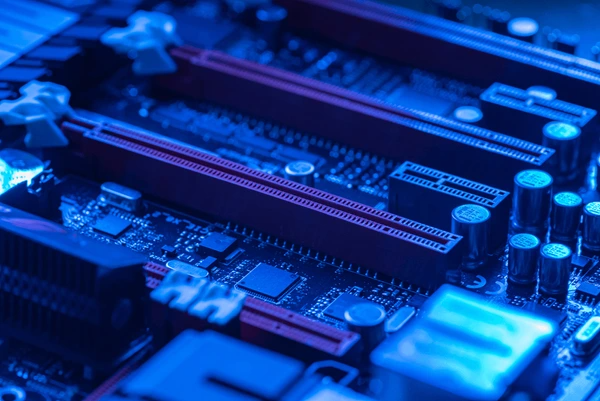
A PCIe slot is a hybrid expansion slot that complies with both the Peripheral Component Interconnect (PCI) and Peripheral Component Interconnect Express (PCIe) specifications. It is designed to support the PCIe standard, which has evolved over time to increase data transfer rates.
How Does a PCIe Slot Work?
- Serial Communication: PCIe operates on a serial communication basis, which means data is transmitted bit by bit over a single communication channel. This is in contrast to older parallel bus systems, which used multiple wires to transmit data simultaneously.
- Point-to-Point Connection: Each PCIe device is connected directly to the motherboard or another device through a point-to-point link. This design allows for better performance and scalability compared to shared bus architectures.
- Packet-Based Communication: PCIe uses packetized protocol for data transfer. This involves breaking down data into packets, which are then transmitted over the link. This method allows for efficient data transfer and error detection.
- Multi-Lane Operation: PCIe supports multiple lanes of communication, which can be combined to achieve higher bandwidth. For example, an x16 PCIe slot can provide up to 16 lanes, resulting in a total bandwidth of 128 GT/s in the latest PCIe 7.0 standard.
- Hot-Plug Capability: One of the key features of PCIe is its support for hot-plug operations. This allows devices to be added or removed from the system without powering it down, enhancing flexibility and reliability.
Types of PCIe Slots
- x1 Slot: A single-lane slot, providing 250 MB/s of bandwidth. Suitable for low-bandwidth devices like network cards and sound cards.
- x4 Slot: A four-lane slot, providing 1000 MB/s of bandwidth. Suitable for mid-range devices like SSDs and network cards.
- x8 Slot: An eight-lane slot, providing 2000 MB/s of bandwidth. Suitable for high-bandwidth devices like graphics cards.
- x16 Slot: A sixteen-lane slot, providing 4000 MB/s of bandwidth. Suitable for high-performance devices like high-end graphics cards and SSDs.
- x32 Slot: A thirty-two-lane slot, providing 8000 MB/s of bandwidth. Typically used in data center and server applications.
Generations of PCIe
- PCIe 1.0: Released in 2002, it offered a maximum bandwidth of 250 MB/s per lane. It was the first major upgrade over the older PCI and PCI-X standards.
- PCIe 2.0: Released in 2006, it doubled the bandwidth to 500 MB/s per lane. It also introduced improvements in power management and error handling.
- PCIe 3.0: Released in 2010, it further increased the bandwidth to 1 GB/s per lane. It also introduced support for newer technologies like M.2 and NVMe.
- PCIe 4.0: Released in 2017, it quadrupled the bandwidth to 2 GB/s per lane. It also introduced new features like PCIe Lanes over the DisplayPort.
- PCIe 5.0: Released in 2019, it further increased the bandwidth to 4 GB/s per lane. It also introduced improvements in power management and thermal design.
- PCIe 6.0: Released in 2021, it doubled the bandwidth again to 8 GB/s per lane. It also introduced new features like PCIe Lanes over USB4.
- PCIe 7.0: Released in 2023, it further increased the bandwidth to 16 GB/s per lane. It also introduced further improvements in power management and thermal design.
How to Identify PCIe Slots on a Motherboard
- Check the Motherboard Manual: The user manual or specification sheet provided by the motherboard manufacturer will detail the types and generations of PCIe slots available.
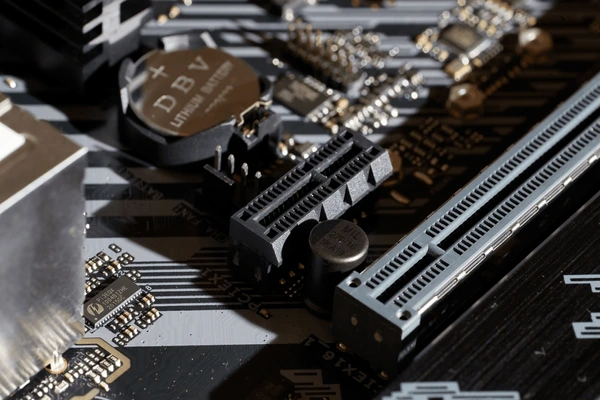
- Look for Physical Indicators: PCIe slots are often labeled with their width (x1, x4, x8, x16) and generation (PCIe 3.0, PCIe 4.0, etc.). These labels are usually located on the edge of the slot.
- Use Diagnostic Software: Software tools like CPU-Z or HWiNFO can scan the motherboard and provide detailed information about the PCIe slots, including their generation and capabilities.
- Check the BIOS/UEFI: Entering the BIOS/UEFI settings on the motherboard can provide information about the PCIe slots, including their configuration and available bandwidth.
Choosing the Right PCIe Slot for Your Component
- Bandwidth Requirements: Ensure the slot provides enough bandwidth for the device. For example, a high-end GPU would require a PCIe 3.0 x16 or PCIe 4.0 x16 slot.
- Compatibility: Check if the motherboard supports the specific PCIe generation required by the component.
- Future-Proofing: Consider the future upgrade path. Newer PCIe generations offer better performance and future-proofing.
Applications of PCIe Slot
- Graphics Cards: PCIe slots are primarily used to connect graphics processing units (GPUs). This allows for high-speed data transfer between the GPU and the CPU, enabling better performance for graphics-intensive tasks such as gaming, video editing, and 3D rendering.
- Storage Devices: PCIe SSDs (Solid State Drives) are connected through PCIe slots to provide high-speed storage solutions. These SSDs use the NVMe protocol, which offers significantly faster read and write speeds compared to traditional SATA SSDs.
- Network Interface Cards (NICs): PCIe slots are used to connect NICs, which provide high-speed network connectivity. This is particularly important for data centers and servers that require high bandwidth for networking.
- Audio and Communication Devices: Some audio cards and communication devices also use PCIe slots for connecting to the motherboard, allowing for high-speed data transfer and low latency.
- Expansion Cards: Various expansion cards such as RAID controllers, SAS controllers, and other specialized cards use PCIe slots to connect to the motherboard, providing additional functionality to the system.
- Machine Learning and AI Accelerators: PCIe slots are used to connect accelerators for machine learning and artificial intelligence, enabling faster processing of large datasets and complex algorithms.
- Data Centers and Enterprise Solutions: In data centers, PCIe slots are used to connect high-performance SSDs and other storage solutions, providing the necessary bandwidth for enterprise-level applications and workloads.
Application Cases
| Product/Project | Technical Outcomes | Application Scenarios |
|---|---|---|
| Intel Data Center GPU Max Series | Optimized for AI/ML workloads, providing high throughput and low latency for data center applications. | Data centers, cloud computing, and high-performance computing (HPC) environments. |
| NVIDIA RTX A6000 | Delivers superior performance for professional visualization and AI-accelerated applications. | Design, engineering, and creative workflows, as well as AI and machine learning applications. |
| AMD Radeon Pro W6800 | Optimized for professional visualization and compute-intensive workloads, with support for hardware-accelerated ray tracing. | Professional design, engineering, and content creation applications, as well as virtual reality (VR) and augmented reality (AR) experiences. |
| Xilinx Alveo U50 | Provides high-performance and low-latency acceleration for data center and edge computing applications. | Data center acceleration, edge computing, and real-time processing for applications such as video transcoding, financial computing, and network acceleration. |
| Broadcom Tomahawk 4 | Delivers high-performance and energy-efficient Ethernet switching for data center networks. | Data center networking, cloud computing, and high-performance computing (HPC) environments. |
Latest Technical Innovations in PCIe Slot
- Higher Transmission Speeds:
- The PCIe standard has seen rapid evolution, with each new revision doubling the transmission speed. From PCIe 3.0 at 8GT/s to the latest PCIe 6.0 at 64GT/s, these improvements enable faster data transfer rates, which are crucial for applications requiring high bandwidth.
- The introduction of PCIe 4.0 at 16GT/s and PCIe 5.0 at 32GT/s further extends the capabilities of PCIe slots, supporting more demanding applications such as high-performance computing, AI, and data centers.
- Improved Efficiency and Power Management:
- PCIe 6.0 introduces new features like PAM4 (Pulse Amplitude Modulation 4) signaling, which enhances efficiency and allows for higher data rates over existing cables without significant changes to the physical infrastructure.
- Advanced Error Reporting (AER) and hardware I/O virtualization are also part of recent revisions, improving system reliability and scalability.
- Enhanced Virtualization and Multi-User Support:
- NVIDIA GRID technology leverages PCIe slots to offload graphics processing from the CPU to the GPU in virtualized environments, allowing multiple users to share a single GPU while maintaining high performance and compatibility.
- This technology is particularly beneficial for cloud server efficiency, as it offloads CPU-intensive tasks like H.264 encoding to the GPU, enabling better performance per watt for enterprise data centers.
- Innovative Form Factors and Design:
- The development of flexible expansion slot designs allows PCIe slots to be optionally configured for different types of peripherals, catering to the diverse needs of emerging I/O devices.
- These innovations include the use of point-to-point topology, which provides better performance and scalability compared to traditional shared bus architectures.
To get detailed scientific explanations of PCIe Slots, try Patsnap Eureka.
