


Introduction
When comparing WQHD vs. QHD, it’s important to understand how these resolutions enhance your viewing experience. Both WQHD (Wide Quad High Definition) and QHD (Quad High Definition) offer sharp image quality with a resolution of 2560 x 1440 pixels. While they share the same pixel count, the term “WQHD” emphasizes the widescreen format commonly used in modern displays. In this article, we’ll dive into the similarities and differences between WQHD and QHD, and how they stack up against higher resolutions like 4K UHD.
WQHD vs. QHD – What’s the difference? Eureka Technical Q&A explains how both offer sharp visuals, but WQHD provides a wider display, helping you decide which resolution suits your screen size and usage best.

What is QHD (Quad High Definition)?
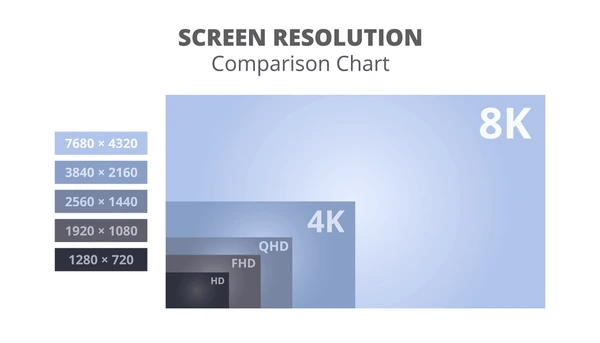
QHD, or Quad High Definition, refers to a display resolution of 2560 x 1440 pixels. This resolution offers more clarity than Full HD (1080p) while falling just below Ultra HD (4K).
With sharper and more detailed images than Full HD, QHD is perfect for gaming, graphic design, and video playback. It provides an immersive experience for entertainment and creative tasks.
The higher resolution also supports more on-screen elements without reducing clarity. This feature makes QHD ideal for multitasking and boosting productivity, allowing users to view multiple windows side by side. QHD is widely used in premium monitors, laptops, and mobile devices. Its balance between resolution and performance ensures an enhanced visual experience for both work and play.
What is WQHD (Wide Quad High Definition)?
WQHD, or Wide Quad High Definition, features a resolution of 2560 x 1440 pixels. This resolution delivers sharper details and improved clarity compared to standard HD resolutions, making it ideal for various applications.
With a pixel density of around 300 pixels per inch (PPI), WQHD enhances the visual experience, especially on larger screens. This high level of detail makes it perfect for professional design work, immersive gaming, and seamless media consumption.
WQHD strikes a great balance between resolution and performance. It offers smooth operation without requiring extremely powerful hardware, making it a popular choice for high-end monitors and displays. Whether for productivity or entertainment, WQHD ensures stunning visuals and reliable performance.
What Is 4K UHD (Ultra High Definition)?
4K UHD, or Ultra High Definition, offers a resolution of 3840 x 2160 pixels, which is four times higher than Full HD (1920 x 1080 pixels). This impressive resolution provides exceptionally clear and detailed images, making it a standout choice for modern displays.
With increased pixel density, 4K UHD enhances the visual experience by delivering sharper visuals and more lifelike details. It’s perfect for large screens where higher resolution truly shines, ensuring a stunning level of immersion.
The “UHD” aspect goes beyond resolution, incorporating a wider color gamut, improved contrast, and smoother frame rates. These features work together to create a viewing experience that is not only visually striking but also more dynamic and vibrant.
4K UHD has become the standard for high-quality content, offering unparalleled clarity and performance for both entertainment and productivity. It’s the go-to resolution for those seeking the best in visual technology.

Key Differences Between WQHD,QHD and 4K UHD
Resolution
- WQHD: Offers a resolution of 2560×1440 pixels, delivering crisp visuals suitable for most applications.
- QHD: Features a resolution of 2560×1600 pixels, slightly taller than WQHD, offering additional vertical space.
- 4K UHD: Provides a resolution of 3840×2160 pixels, four times higher than Full HD, ensuring unmatched clarity and detail.
Pixel Density (PPI)
Pixel density is calculated by dividing the number of pixels by the screen’s diagonal length. For instance:
- A 15.6-inch WQHD monitor delivers about 185 PPI.
- A 15.6-inch 4K UHD monitor offers around 282 PPI.
In general, 4K UHD has a higher pixel density, resulting in sharper and more detailed visuals than WQHD and QHD.
Display Quality
- 4K UHD: Excels in delivering stunning detail and clarity, making it ideal for professional tasks like video editing, gaming, and virtual reality.
- WQHD and QHD: While still visually impressive, they fall short of 4K UHD’s detail. These resolutions are great for web browsing, office work, and casual gaming.
Usage Scenarios
- 4K UHD: Perfect for professional content creation, high-end gaming, and tasks requiring high visual fidelity.
- WQHD and QHD: Suitable for everyday productivity, general gaming, and media consumption. They offer a balance of performance and usability.
Hardware Requirements
- 4K UHD: Demands powerful hardware, including faster processors, more memory, and dedicated graphics cards, to handle the high resolution.
- WQHD and QHD: Require less intensive hardware, making them more accessible for a broader range of users.
Which Resolution Is Right for You?
1. Screen Size
Larger screens benefit the most from higher resolutions like 4K, as they display finer details more effectively. On smaller screens, the difference between resolutions may not be as noticeable.
2. Hardware Performance
Higher resolutions like 4K demand more processing power from GPUs and CPUs to maintain smooth performance. Ensuring your device can handle the resolution is crucial, especially for gaming and content creation.
3. Use Case
The best resolution depends on how you plan to use your device:
- Gaming: Higher resolutions like 4K enhance visuals but require robust hardware.
- Content Creation: Resolutions such as 4K provide detailed clarity for editing photos and videos.
- General Use: QHD is often sufficient, balancing performance with image quality.
4. Power Consumption
Higher resolutions, such as 4K, typically consume more power, which impacts battery life on portable devices. For energy efficiency, lower resolutions like QHD might be a better choice.
Recommendations
- QHD: Ideal for most modern laptops and tablets, offering excellent detail without straining hardware or battery life.
- 4K: Perfect for high-end monitors, gaming PCs, and tasks requiring top-tier image quality. However, it demands more powerful hardware.
- UHD: Often synonymous with 4K, it delivers exceptional resolution and suits devices designed to handle high performance.
Choosing the right resolution involves balancing screen size, hardware capability, and your specific use case. With the right choice, you’ll enjoy the best mix of performance, clarity, and efficiency.
Analyzing WQHD vs. QHD Trends with PatSnap Eureka
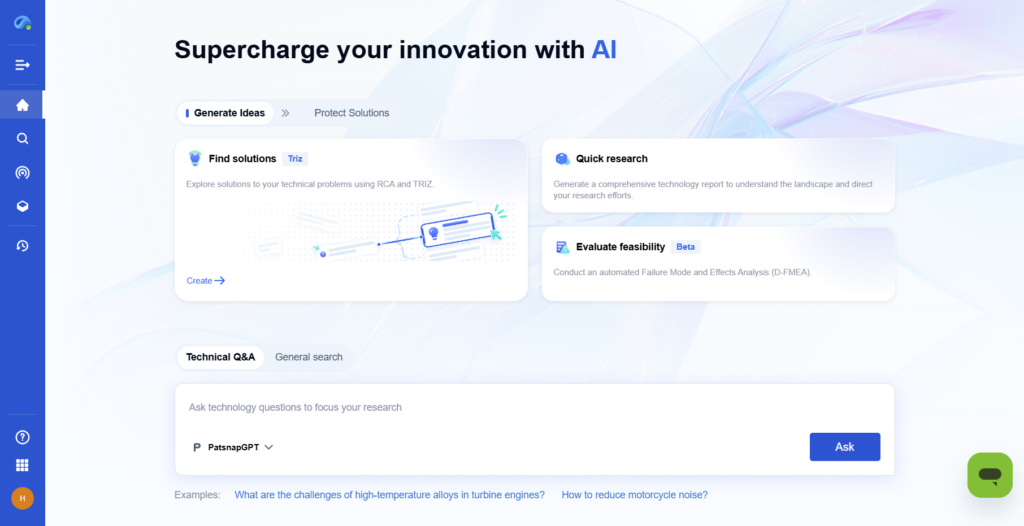
When evaluating WQHD vs. QHD innovations, PatSnap Eureka empowers R&D and IP teams to uncover which resolution standard is driving more technological advancement. Through Eureka’s intuitive research platform, users can explore global patent activity, identify key inventors and assignees working on high-resolution display technologies, and benchmark emerging trends across industries. Whether comparing market adoption rates or uncovering whitespace opportunities in the display sector, Eureka helps teams make data-driven decisions backed by deep IP intelligence.
Conclusion
WQHD and QHD both offer sharp visuals and excellent performance, making them ideal for gaming, productivity, and media use. WQHD balances clarity and efficiency for most users, while QHD provides extra vertical space for professional tasks. Your choice ultimately depends on your specific needs and device capabilities, but both resolutions ensure a great viewing experience.
To get detailed scientific explanations of WQHD vs. QHD, try Patsnap Eureka.
