It’s been invaluable to quickly obtain high-quality application cases from my searches. This tool has been a real asset in overcoming the challenges of finding breakthrough solutions, allowing us to move forward with confidence in our R&D efforts.
Patsnap Eureka AI Agent for Innovation
DFMEA Assistant
Conduct an automated failure mode and effects analysis (D-FMEA)
Try DFMEA Assistant, Streamline your Risk Analysis and Boost Innovation Efficiency
Before
You spend hours piecing together patent search queries, manually reviewing results, and still risk missing key prior art.

After
With DFMEA Assistant, simply enter your technical solution and get automated failure mode analysis with suggested corrective actions.

How to Automate Failure Mode Analysis with DFMEA Assistant?
Enter your system or component functions into DFMEA Assistant to instantly identify risks and generate structured failure mode analysis.
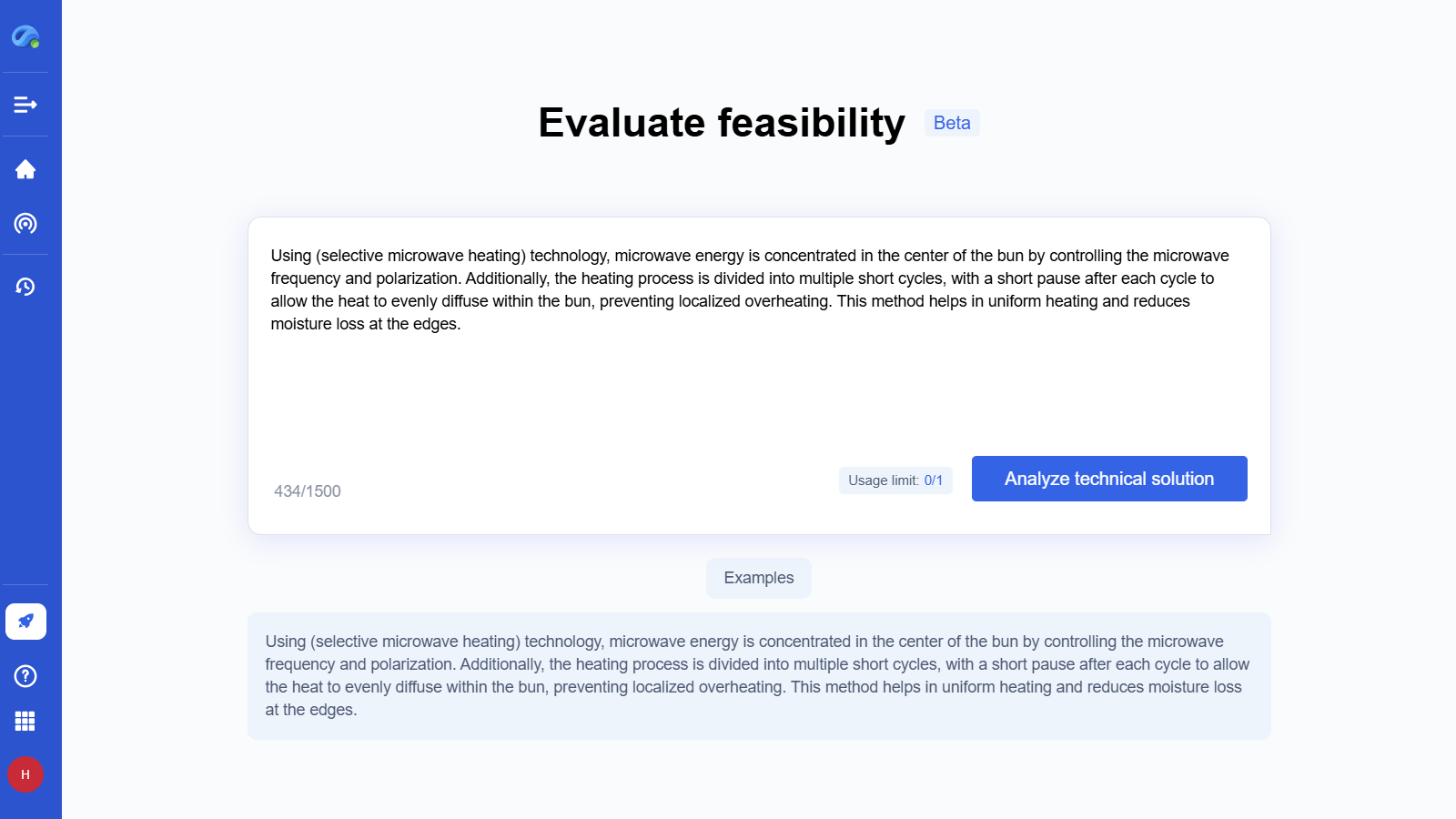
Step 1 - Enter D-FMEA Asistant Agent & Input Your Technical Solution
If you already have a preliminary technical solution, you can quickly assess the FMEA by clicking ”Creat” on the homepage.
Click the input box, complete your input, and then click the “Analyze technicalsolution ” button to enter the analysis page.
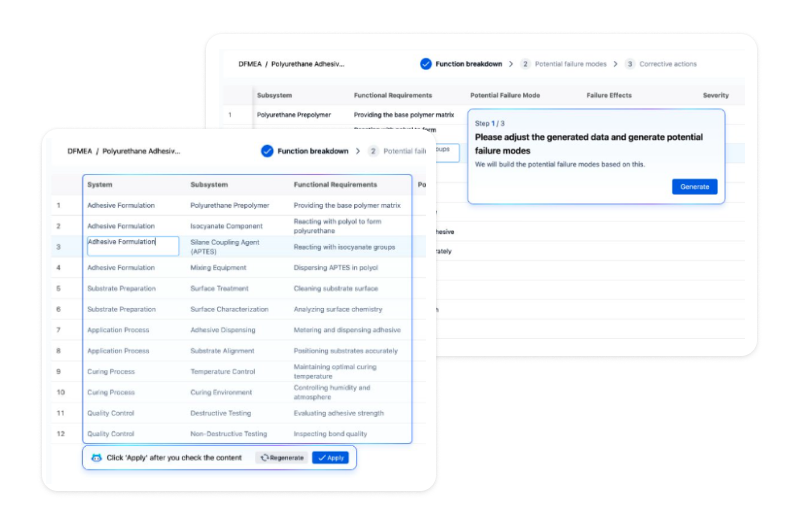
Step 2 - Apply Function Breakdown & Generate Potential Failure Modes
During the analysis process, the issues will undergo “function breakdown.” You can modify the generated content or regenerate it. Once confirmed, click “Apply” to finalize the decomposition results.
After applying the “ function breakdown,” you can still make modifications. Once confirmed, you can click the “Generate” button to create the “potential failure modes”
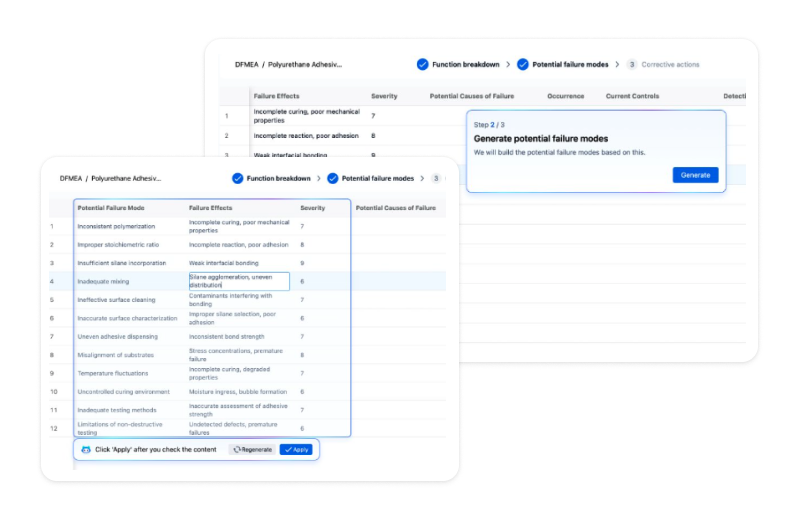
Step 3 - Apply Potential Failure Modes & Generate Corrective Actions
Once confirmed, click “Apply” to finalize the potential failure modes
After applying the “potential failure modes,” you can still make modifications. Once confirmed, you can click the “Generate” button to create the “corrective actions”
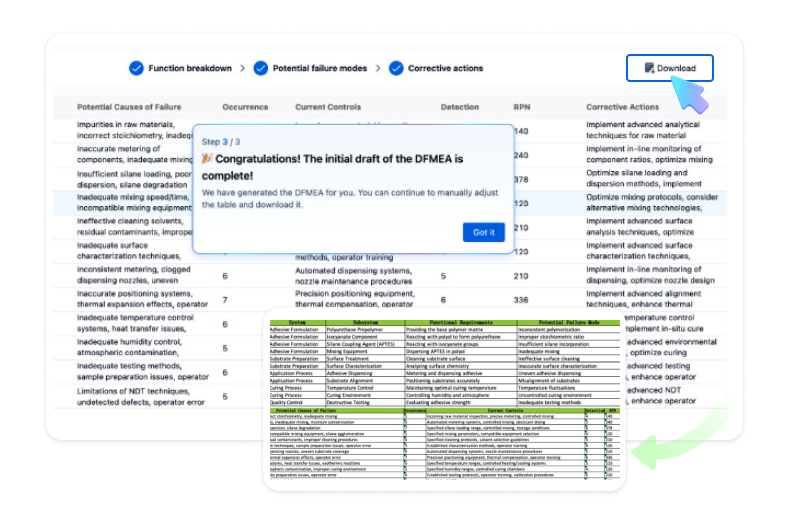
Step 4 - Complete the Initial Draft of the DFMEA & Download
Once apply the corrective actions,the DFMEA is complete!
Once the D-FMEA is complete ,you can download and adjust
TESTIMONIALS
What Our Clients Say About Us
Patsnap Eureka AI Agent consistently delivers insights that help our clients solve problems faster, innovate smarter, and stay ahead of the curve.
Find solution’s been helpful to analyze problems and find market application cases, it gives instant ideas and understanding of some technical principles, greatly improving my project progress.

The level of detail I’m getting from these searches is exceptional and far exceeds my expectations. It’s a tremendous help when I’m lacking new R&D inspiration and need fresh ideas to push the boundaries of our product development.

Why Choose Patsnap Eureka AI Agent?
RAG Optimization
Maximizing Optimization of General Large Model Hallucinations
High-quality Vertical Data & Data Governance
Power search, drafting, discovery, and assessment.
Deep integration of R&D innovation methodologies
AI outputs linked to verified sources.
Eureka AI Agents built for the complexity of IP and R&D. Automate labor-intensive workflows, freeing experts to focus on high-impact decisions and innovation. Smart Enough for Scientists. Secure Enough for Enterprises.
Sign up for free: Eureka AI Agent. You can find guide to each agent in this page, and try it according to your requirements.
With 3 major capacities:
1. Maximizing Optimization of General Large Model Hallucinations
2. High-quality Vertical Data and Data Governance
3. Deep integration of R&D innovation methodologies
FAQ
Frequently Asked Questions
Everything you want to know about Patsnap Eureka AI Agent Platform. Feel free to contact us if you have any questions: help@patsnap.com.
Better Answers, Faster Decisions
Harness the power of Eureka AI Agent to unlock deep insights, accelerate innovation, and elevate your R&D strategy.