

Shortcut operation method for touchpad
An operation method and touchpad technology, which are applied in the fields of instruments, electrical digital data processing, and data processing input/output processes, etc., can solve problems such as reducing efficiency, and achieve the effect of convenient and effective editing of files.
- Summary
- Abstract
- Description
- Claims
- Application Information
AI Technical Summary
Problems solved by technology
Method used
Image



Examples
no. 1 example
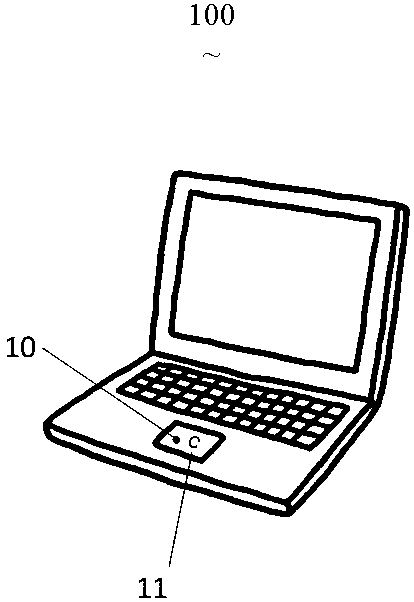
[0027] like figure 1 As shown, the first embodiment of the present invention provides a touchpad shortcut operation method 100, including lightly touching the first contact point 10 of the touchpad with the first finger and keeping it still, and then sliding out the track 11 on the touchpad with other fingers .
[0028] Trace 11 resembles a C shape, so it outputs a Ctrl-C keypress signal.
[0029] In this embodiment, the track 11 is located on the right side of the first contact point 10, but in other embodiments, the track 11 can be located at any position of the first contact point 10, including the left side, the lower side or the upper side, without limitation. .
[0030] Using the embodiment of the present invention, people will first select a piece of text in the text editing process, and then use this operation to copy this text; or, in the graphic editing process, they will first select a graphic, and then use this operation to copy the text; Copy this graphic.
no. 2 example
[0032] like figure 2 As shown, the second embodiment of the present invention provides a touchpad shortcut operation method 200, including lightly touching the first contact point 10 of the touchpad with the first finger and keeping it still, and then sliding out the track 11 on the touchpad with other fingers .
[0033] Trace 11 resembles a V shape, so it will output a Ctrl-V keypress signal.
[0034] In this embodiment, the track 11 is located on the left side of the first contact point 10, but in other embodiments, the track 11 can be located at any position of the first contact point 10, including the right side, the lower side or the upper side, without limitation. .
[0035] Using the embodiment of the present invention, people will move the cursor to other positions after copying some characters in the text editing process, and use this operation to paste these characters; or, in the graphic editing process, after copying a graphic , will use this operation to paste...
no. 3 example
[0037] like image 3 As shown, the third embodiment of the present invention provides a touchpad shortcut operation method 300, which includes lightly touching the first contact point 10 of the touchpad with the first finger and keeping it still, and then lightly touching the touchpad with other fingers. Click on the second touch point 12 .
[0038] Since the second contact point 12 is located on the right side of the first contact point 10, it will output a Delete key signal.
[0039] Using the embodiment of the present invention, people will use this operation to delete the content behind the cursor after confirming the cursor position in the process of text editing; or, in the process of graphic editing, after confirming a graphic target, they will use this operation to delete the graphic.
PUM
 Login to View More
 Abstract
Description
Claims
Application Information
 Login to View More