


What Is an SFP Port?
The SFP port is a compact, hot-pluggable transceiver used for both telecommunication and data communications applications.
They interface a network device motherboard (such as a switch, router, or media converter) to a fiber optic or copper networking cable, supporting various communication standards like SONET, Gigabit Ethernet, and Fibre Channel.
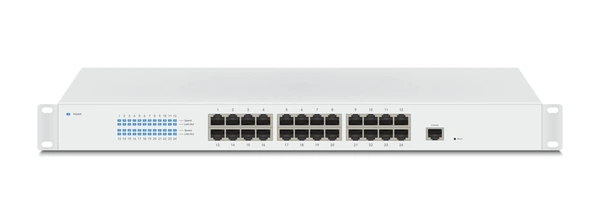
How an SFP Port Works
SFP ports operate based on industry standards, primarily the IEEE 802.3 Ethernet standard and its extensions:
- For fiber optic transmission, SFP ports support various protocols like 1000BASE-SX (multi-mode fiber), 1000BASE-LX (single-mode fiber), and higher data rates up to 10 Gbps with SFP+.
- For copper transmission, SFP ports can support 1000BASE-T (twisted-pair copper cables) at 1 Gbps.
- The SFP transceiver module contains a serializer/deserializer (SerDes) chip that converts parallel data from the network device into a serial data stream for transmission over the cable.
Types of SFP Modules
- SFP: Supports data rates up to 4 Gbps, used for Gigabit Ethernet and Fibre Channel.
- SFP+: Supports 10 Gbps data rates, compatible with 10 Gigabit Ethernet and 8 Gbps Fibre Channel.
- SFP28: Supports 25 Gbps data rates, used for 25 Gigabit Ethernet and 32 Gbps Fibre Channel.
- QSFP (Quad SFP): Provides four channels of SFP interfaces, available in 40 Gbps (QSFP+) and 100 Gbps (QSFP28) versions.
Benefits of Using SFP Ports
- Hot-pluggable: SFP transceivers can be inserted and removed without powering down the network device, enabling seamless upgrades and maintenance.
- Versatility: SFP ports support a wide range of cable types (fiber optic, copper) and transmission protocols, allowing flexibility in network infrastructure.
- High density: The compact form factor of SFP ports enables high port densities on network devices, optimizing space utilization.
- Digital diagnostics: SFP transceivers often include digital monitoring capabilities (e.g., temperature, voltage, transmit power) for enhanced monitoring and troubleshooting.
How to Use an SFP Port
- Select the appropriate SFP module (optical/copper, wavelength, distance) based on network requirements.
- Insert the SFP module into the port on the network device (switch, router, media converter).
- Connect the fiber optic or copper cable to the SFP module.
- Configure the SFP port settings (speed, duplex mode) as per the network device and SFP module specifications.
- Monitor the SFP port status and signal quality for optimal performance.
Applications of SFP Port
Telecommunications and Data Networking
SFP ports are widely used in telecommunications and data networking applications to interface between network devices (switches, routers, etc.) and fiber optic or copper cables. They enable high-speed data transmission over various protocols like Gigabit Ethernet, Fibre Channel, and SONET/SDH.
Versatile Connectivity Options
SFP ports offer versatile connectivity options by supporting a range of transceiver modules for different cable types (multi-mode fiber, single-mode fiber, copper) and data rates (1G, 10G, etc.). This flexibility allows network administrators to easily adapt to changing requirements without replacing entire devices.
High-Density Port Configurations
The small form factor of SFP ports enables high-density port configurations in network equipment, allowing more ports to be accommodated in a limited space compared to larger interfaces like GBIC. This is particularly beneficial in data centers and high-performance computing environments.
Hot-Swappable and Plug-and-Play
SFP ports support hot-swappable and plug-and-play capabilities, allowing transceiver modules to be replaced or reconfigured without powering down the entire system. This minimizes downtime and simplifies maintenance in mission-critical applications.
Emerging Applications
While traditionally used in networking, SFP ports are finding new applications in emerging technologies like:
- High-Performance Computing (HPC) interconnects
- Data Center Interconnects (DCI) for cloud computing
- 5G and beyond mobile networks
- Internet of Things (IoT) gateways and edge computing devices
Latest Technical Innovations in SFP Port
Scalable SDN Federation
The Software Defined Networking (SDN) Federation Protocol (SFP) has emerged as a novel approach to interconnect multiple SDN networks in a scalable, efficient, and stable manner. Unlike traditional push protocols like BGP, SFP adopts a flexible pub-sub model to enable autonomous federation of network resources across domains. It introduces flexible information spaces like packet and flowset spaces for more efficient resource sharing.
High-Speed Server Interconnects
SFP+ interfaces are being leveraged in server network cards to provide high-bandwidth, low-latency interconnects between servers and external networks. By converting backplane signals to SFI format and communicating via SFP+ ports, these cards enable flexible utilization of system network resources and higher data rates (e.g. 10Gbps).
Automatic SFP Mode Configuration
Innovations allow switches to automatically detect the type of SFP module inserted and configure the SFP port to the matching mode without manual intervention. This improves SFP resource utilization and ease of use. Advanced switches support multiple SFP modes in their PHY chips and can reconfigure the port if an initial mode mismatch is detected.
High-Speed Multi-Channel Interconnects
To enable higher data rates beyond traditional SFP/SFP+ speeds, new connector designs add extra rows of conductors while maintaining backward compatibility with existing connectors. For example, a connector with three rows (two on one side, one on the other) can support higher multi-channel throughput while still interfacing with legacy two-row connectors.
Intelligent Status Monitoring
SFP transceivers now incorporate intelligent status monitoring capabilities to track real-time operating parameters like temperature, voltage, transmit/receive power levels, etc. This enables proactive fault detection and prevention of failures. Visual indicators on the SFP module itself can also convey link and operational status.
FAQs
- What does SFP stand for, and what does it do?
SFP stands for Small Form-Factor Pluggable. It allows devices to connect using different cable types, including fiber optics and Ethernet. - Are SFP ports compatible with Ethernet cables?
Yes, with a copper SFP module, you can connect Ethernet cables to an SFP port. - What is the difference between SFP and SFP+ ports?
SFP supports speeds up to 1 Gbps, while SFP+ supports speeds up to 10 Gbps. - Can SFP modules be used interchangeably between brands?
Some modules are proprietary, but many third-party SFP modules offer cross-compatibility. - What speeds and distances can SFP ports support?
SFP ports can handle speeds from 100 Mbps to 10 Gbps and distances from a few meters to over 80 km, depending on the module.
To get detailed scientific explanations of SFP ports, try Patsnap Eureka.

Learn more
Multiplexor: Efficient Data Selector for Electronics
Understanding STP Cable: Shielded Twisted Pair Explained
Understanding Twisted Pair Cable: Basics, Benefits, and Uses
JFET 101: A Beginner’s Guide to Junction Field-Effect Transistors
HDMI vs. DisplayPort: Which is Best for Your Monitor?