


What Is a VGA Connector?
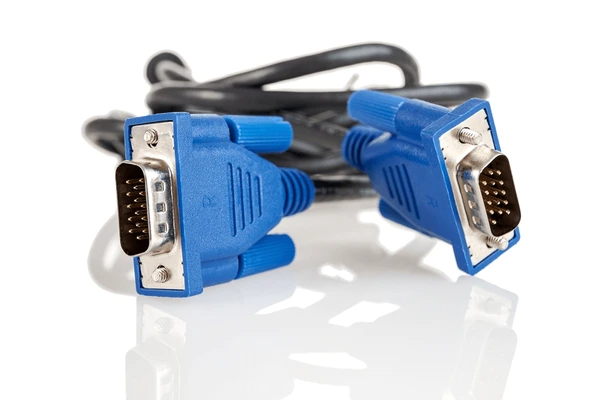
VGA connectors, often called D-Sub connectors or VGA ports, are essential in display technology. These analog video interfaces connect monitors, projectors, and other video equipment to computers or video players. Recognized by their 15-pin D-shaped design, they feature three rows of five pins each. Known for their versatility, VGA connectors transmit high-resolution analog video signals seamlessly. They support various display modes with different resolutions and color depths, making them a reliable choice for many devices. This article explores the role, features, and significance of VGA connectors in modern display setups.
Features and Specifications of VGA Connectors
Features of VGA
- 1. Distinctive 15-Pin Design
The 15-pin “D” shape ensures secure connections and prevents incorrect insertion during setup. - 2. Analog Signal Transmission
VGA transmits analog signals, including RGB (red, green, and blue) components, along with horizontal and vertical synchronization signals. - 3. Backward Compatibility
It supports older standards like CGA and EGA, making it versatile for legacy systems. - 4. Simplicity in Design
The interface features a straightforward design, making it easier to implement than modern digital standards. - 5. Widespread Adoption
Despite being an older technology, VGA remains common in older systems and even some newer devices.
Specifications of VGA
- 1. Signal Characteristics
The interface operates at 0.7V peak-to-peak amplitude with 75-ohm impedance for reliable analog signal transmission. - 2. Supported Resolutions and Color Depth
VGA supports resolutions up to 1024×768 pixels with 8 bits per channel for true color visuals. - 3. Connector Type
The familiar 15-pin D-subminiature design ensures consistent and durable connections. - 4. Cable Requirements
VGA cables contain five or seven twisted pairs to efficiently carry analog signals and synchronization information. - 5. Bandwidth Limitations
Its analog nature restricts bandwidth, refresh rates, and resolutions compared to modern interfaces like HDMI or DisplayPort. - 6. Lack of Digital Features
VGA cannot support digital audio or additional data streams, a limitation compared to newer digital standards.
Common Uses of VGA Connectors
1. Video Signal Transmission
VGA is widely used to transmit analog video signals from computers to monitors or projectors. It carries red, green, and blue (RGB) color signals, along with horizontal and vertical synchronization, ensuring clear image display.
2. Standardized Interface
As a universal standard, VGA enables compatibility between various graphic and display devices. Its standardized 15-pin D-sub format ensures seamless integration across equipment from different manufacturers.
3. Advantages and Drawbacks
VGA’s success comes with limitations, especially in high-resolution systems. It lacks controlled impedance, requires extensive filtering, and offers minimal shielding, which reduces performance at higher resolutions. Additionally, it cannot handle digital signals, limiting its compatibility with newer display technologies.
4. Continued Use in Modern Devices
Despite its drawbacks, VGA remains popular due to its affordability and widespread adoption. Many PC systems, embedded devices, and older equipment still rely on it. However, its use is steadily declining as digital interfaces like HDMI, DVI, and DisplayPort become more prevalent.
| Product/Project | Technical Outcomes | Application Scenarios |
|---|---|---|
| VGA Connector with Integral Filter NVIDIA Corp. | Incorporates built-in filtering, shielding, and impedance control to enhance signal quality and graphic performance for high-resolution video systems. | High-resolution video graphics systems requiring improved signal stability and compatibility with standard VGA connectors. |
| VGA Testing Apparatus Hong Fu Jin Precision Industry (Shenzhen) Co., Ltd. | Provides a simple and efficient way to couple a VGA connector to an oscilloscope or signal analyzer for testing purposes. | Testing and troubleshooting VGA interfaces in computer systems. |
| Interface Device with Automatic Connector Transformation Coretronic Corp. | Automatically transforms connectors into input or output ports based on signal states, enabling efficient and miniaturized designs with dual functionality in each connector. | Display devices requiring multiple connectors for input and output, enabling compact designs. |
| Cable Assembly with Flat Cable Hon Hai Precision Industry Co., Ltd. | Utilizes a flexible printed circuit and spacer to support a flat cable configuration, enabling compact and adaptable designs with enhanced compatibility. | Cable assemblies for VGA connectors requiring compact and compatible designs. |
Compatibility with Modern Devices
- Understanding HDMI Compatibility
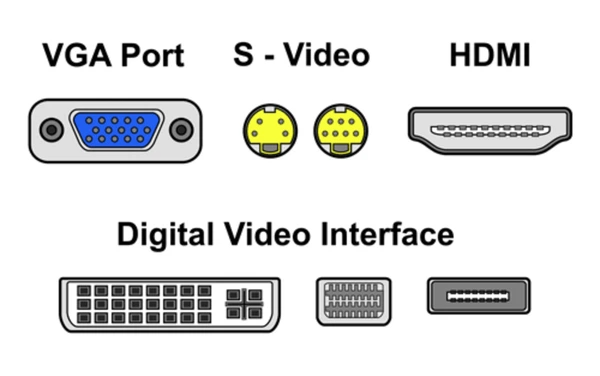
Modern devices primarily use HDMI for video output due to its higher bandwidth and advanced features like HDCP. However, VGA signals cannot directly convert to HDMI without additional hardware. This difference in signal type often affects quality and compatibility. - Conversion Solutions for VGA to HDMI
To connect a VGA output to an HDMI input, a VGA to HDMI converter is necessary. These converters upscale analog VGA signals to digital HDMI. While they are effective, they may not support all resolutions or refresh rates. Some converters can also introduce minor latency during the conversion process. - Display Compatibility in Modern Devices
Modern displays usually feature HDMI ports, with VGA ports becoming increasingly rare. If a display only supports HDMI, a converter is required for compatibility with a VGA source. Additionally, DisplayPort, another common interface with higher bandwidth than HDMI, offers similar conversion solutions. However, VGA to DisplayPort converters are less common than VGA to HDMI options. - Tackling Technical Challenges
Converting VGA signals to HDMI involves transforming analog signals into digital format. This process can sometimes cause quality issues, including pixelation or color distortion. VGA also supports lower resolutions and refresh rates, limiting its performance when converted to HDMI for use with modern devices. - Practical Solutions for Easy Connectivity
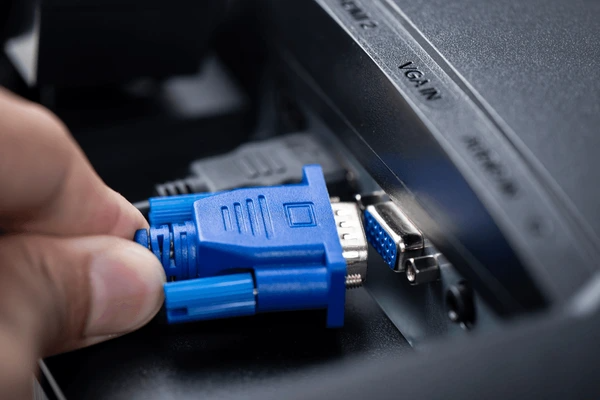
Using external converters is the most common solution for bridging VGA and HDMI devices. These plug-and-play devices work between a VGA output and an HDMI input but may not support all display settings. Cable adapters are another option, though less common, and may only support specific types of VGA signals.
Why VGA is Becoming Obsolete in Modern Technology
1. Outdated Technology
To begin with, VGA operates as an analog standard and relies on a non-linear frame buffer. This outdated approach makes it increasingly difficult to integrate with modern software environments. In contrast, newer standards like DVI and HDMI are digital, providing better performance and greater compatibility with today’s devices.
2. Limited Resolution and Color Capabilities
Furthermore, VGA supports a maximum resolution of 640×480 with only 16 colors, which is insufficient for modern needs. By comparison, HDMI can handle resolutions up to 4K with millions of colors, making it a far better option for delivering high-quality visuals in today’s demanding applications.
3. Lack of Power Management Features
Another significant drawback is that VGA does not support power management, which is essential for mobile computing and energy-efficient systems. Meanwhile, modern standards like HDMI and DisplayPort offer advanced power-saving features, making them much more practical and efficient for contemporary devices.
To get detailed scientific explanations of VGA connectors, try Patsnap Eureka.
