
Method for controlling user interface and electronic equipment
A technology for controlling the user interface and electronic equipment, applied in the direction of electrical digital data processing, input/output process of data processing, instruments, etc., can solve the problems of low user interaction efficiency and low intelligence, reduce complexity and improve interaction efficiency effect
Patent Information
- Authority / Receiving Office
- CN · China
- Patent Type
- Applications(China)
- Current Assignee / Owner
- Publication Date
- 2019-11-08
Smart Images
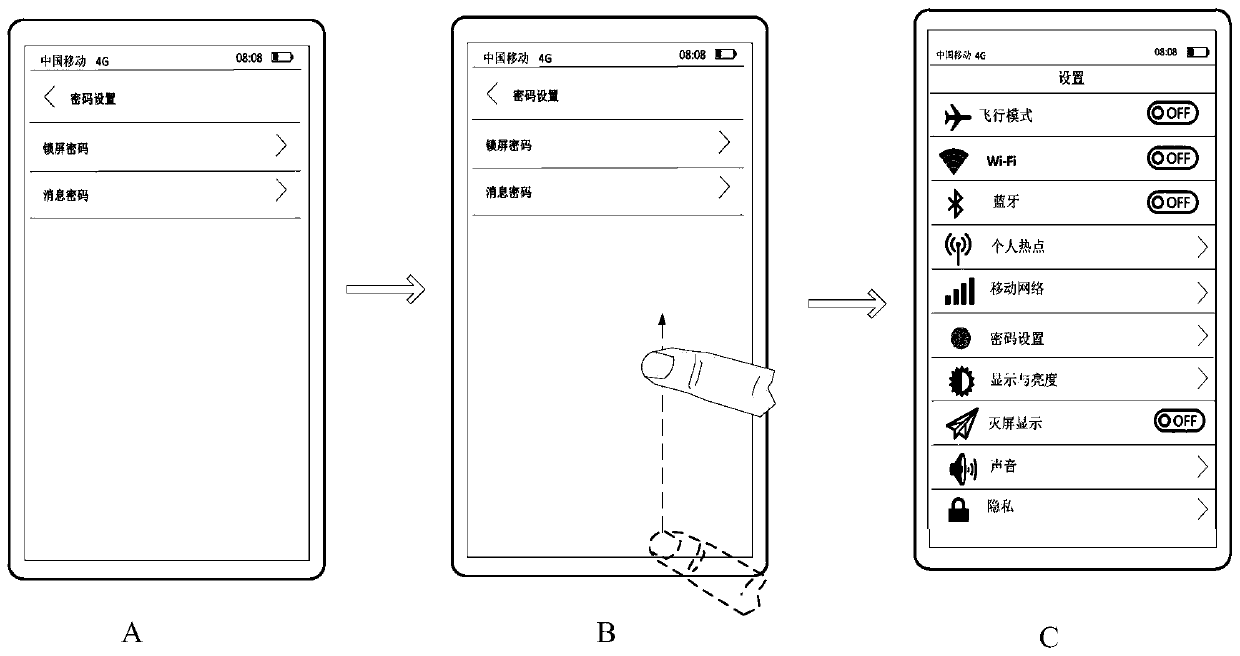
Figure 1 
Figure 2 
Figure 3
Abstract
Description
technical field
[0001] The present application relates to the technical field of terminals, and in particular to a method for controlling a user interface and an electronic device. Background technique
[0002] When users use electronic devices such as mobile phones and tablet computers, there is a need to switch the user interface (UI) of the electronic device, and one of the frequently used interface switching requirements is to switch the current display of the electronic device The user interface switches to display the upper-level user interface. For example: return to the main page of WeChat from the chat interface of WeChat, return to the system desktop from the main page of WeChat, etc.
[0003] The traditional solution is to set a touch button at the bottom of the screen to realize the interface return function, and the user clicks the touch button to trigger the electronic device to switch from the currently displayed first user interface to display the second use...
Examples
example 1
[0125] Example 1: If Figure 5A , 5B As shown, when the user inputs a sliding operation, the first display window shrinks from the edge of the screen to the center of the screen. in, Figure 5A Take the sliding operation as an example of sliding inward from the right edge of the screen, Figure 5B Take the swipe operation as an example of swiping up from the bottom of the screen. Of course, in actual implementation, the position and direction of the sliding operation may also be other implementations such as sliding inward from the left edge of the screen, sliding upward from the bottom edge of the screen, and the embodiments of the present application do not illustrate them one by one.
example 2
[0126] Example 2: If Figure 6A , 6B As shown, when the user inputs a sliding operation, the first display window shrinks along the preset direction, and the first user interface displayed in the first display window is compressed in the preset direction. in, Figure 6A For example, the sliding operation is sliding in from the right edge of the screen, and the zooming out direction is from right to left. Figure 6B For example, the sliding operation is sliding from the bottom of the screen upwards, and the zooming out direction is bottom-up. Of course, in actual implementation, the position and direction of the sliding operation may also be other implementations such as sliding inward from the left edge of the screen, sliding upward from the bottom edge of the screen, and the embodiments of the present application do not illustrate them one by one. Correspondingly, there may be other specific implementation manners for reducing the size of the first display window, which is...
example 3
[0127] Example 3: If Figure 7A , 7B As shown, when the user inputs a sliding operation, the first display window shrinks along a preset direction, and the first user interface displayed in the first display window is partially blocked (cut) in the preset direction. in, Figure 7A Take the sliding operation as an example from the right edge of the screen inwards, and the blocking direction as from right to left. Figure 7B For example, the sliding operation is sliding from the bottom of the screen upwards, and the blocking direction is bottom-up. Of course, in actual implementation, the position and direction of the sliding operation may also be other implementations such as sliding inward from the left edge of the screen, sliding upward from the bottom edge of the screen, and the embodiments of the present application do not illustrate them one by one. Correspondingly, the blocking manner of the first display window may also have other specific implementation manners, whic...