
Security authentication method for wireless network
A security authentication and wireless network technology, applied in the field of wireless network security authentication, can solve the problems of troublesome key input, key cracking, weak encryption strength, etc., to avoid brute force cracking and key leakage, enhance security, and ensure security sexual effect
Patent Information
- Authority / Receiving Office
- CN · China
- Patent Type
- Patents(China)
- Current Assignee / Owner
- Publication Date
- 2014-11-26
Smart Images
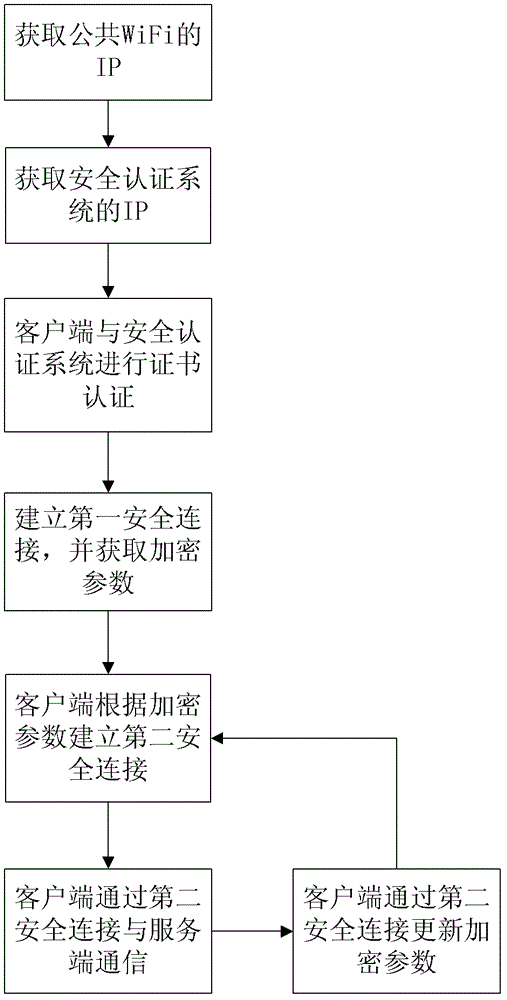
Figure 1
Abstract
Description
technical field
[0001] The invention relates to a method for security authentication, specifically a method for wireless network security authentication. Background technique
[0002] WiFi (Wireless Fidelity) technology is currently a commonly used wireless network access method in homes, businesses, and many more public places. It can gradually replace Ethernet wired connections and has a good development prospect. But there are obvious security problems in the current WiFi wireless system. In the WiFi wireless system, WEP (Wired Equivalent Privacy, wired equivalent privacy) and WPA (WiFi Protected Access, WiFi network security access) systems have very weak encryption strength for keys, while in WPA2 (another WPA PSK (Pre-shared Key, pre-shared key) is used in the system and WAPI (a protocol of China's wireless LAN security mandatory standard), so if a weaker key is used, there will be cracking problems . However, if an overly complex key is used, it will be very troubl...
Examples
Embodiment Construction
[0025] Such as figure 1 The shown wireless network security authentication method of the present invention has a WiFi server and a client, and the steps include:
[0026] a. Deploy the authentication service program on the client, the client scans the wireless network, and automatically accesses the public open system of the WiFi server to obtain the corresponding IP address;
[0027] b. The client obtains the IP address of the security authentication system of the WiFi server according to the IP address of the public open system, and the IP address may be the gateway address of the public open system IP address. The client accesses the address through the SSH authentication port of the security authentication system, and tries to connect;
[0028] c. The security authentication system of the WiFi server requires certificate authentication for the accessed client. The client authenticates with the security authentication system by reading the local certificate or the USBkey ...