
Character input method, character input inputting device and intelligent terminal
A text input and text technology, applied in the field of display, can solve problems such as cumbersome operations and long time-consuming selection of key values
Patent Information
- Authority / Receiving Office
- CN · China
- Patent Type
- Applications(China)
- Current Assignee / Owner
- Publication Date
- 2015-04-08
Smart Images
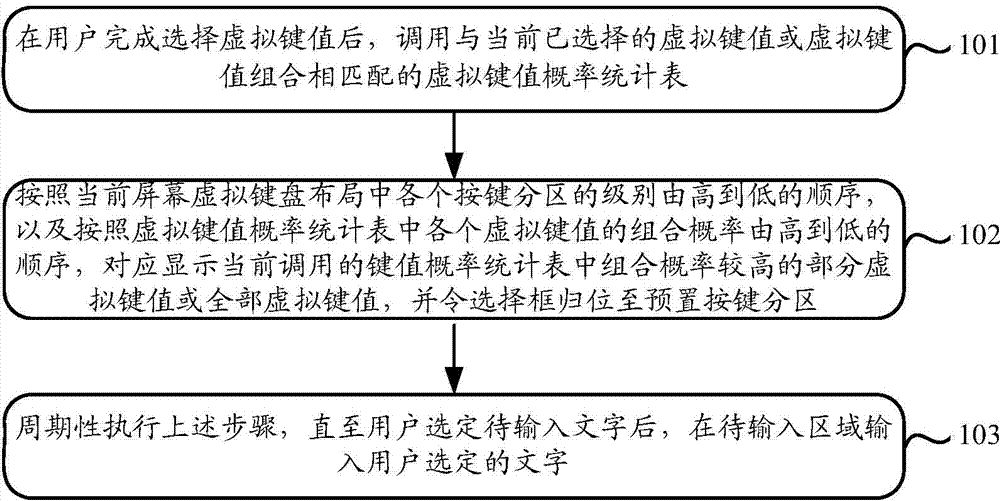
Figure 1 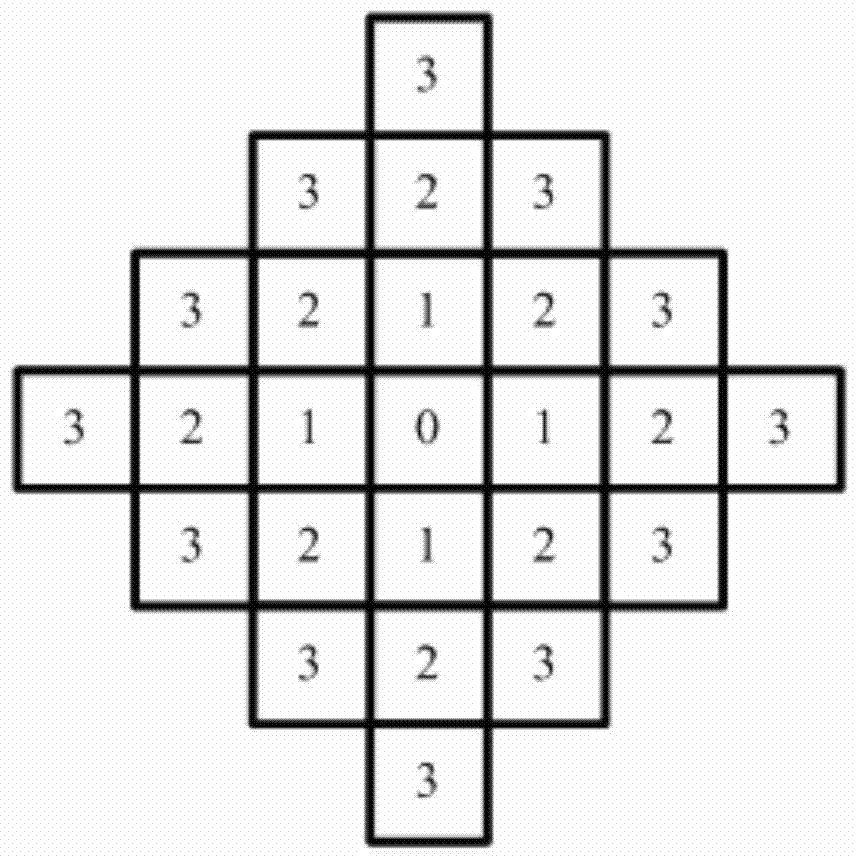
Figure 2 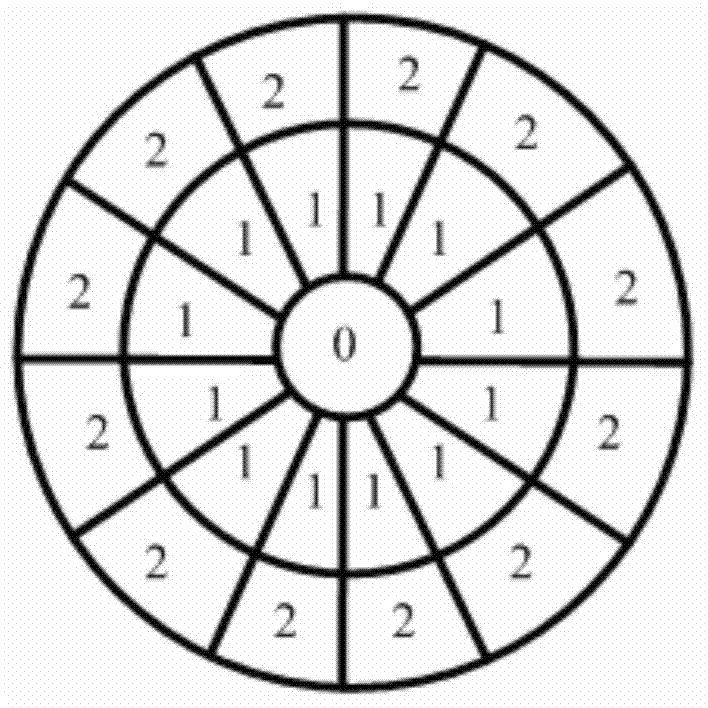
Figure 3
Abstract
Description
technical field
[0001] The present invention relates to the field of display technology, in particular to a text input method, device and intelligent terminal. Background technique
[0002] For currently widely used smart TVs, when inputting text on its application interface, it is necessary to select the key value located in the screen virtual keyboard layout of the smart TV through an input control device such as a remote control. The number is limited, and generally there will not be buttons corresponding to the key values in the screen virtual keyboard layout. Therefore, when the user needs to input text, he can only rely on the navigation buttons (up, down, left, right) in the input control device. key) to move the position of the selection box to select the key value required by the user.
[0003] Moreover, since the position of the key value in the screen virtual keyboard layout is fixed, when the key value to be selected is not in the button partition where the se...
Examples
Embodiment 1
[0034] Such as figure 1 As shown, it is a flow chart of the steps of a text input method provided by Embodiment 1 of the present invention. The text input method can be applied to a smart terminal including a screen, especially to a smart TV; the screen included in the smart TV is set There is a screen virtual keyboard layout, which contains multiple button partitions. The selection box is located in the preset button partition, and the level of the preset button partition is the highest. The order of length decreases from small to large, and the key step size is the minimum number of key partitions experienced by the preset key partition to reach any other key partition.
[0035] The method mainly includes the following steps:
[0036] Step 101: After the user finishes selecting a virtual key, invoke a virtual key probability statistics table matching the currently selected virtual key or combination of virtual keys.
[0037]Specifically, in the embodiment of the present in...
Embodiment 2
[0074] Such as Figure 7 As shown, it is a schematic structural diagram of a text input device provided by Embodiment 2 of the present invention, wherein the text input device can be set in a smart terminal including a screen, especially a smart TV. The specific setting method can be integrated in the smart terminal or plugged in outside the smart terminal.
[0075] The text input device includes the following structural units:
[0076] The calling unit 201 is configured to call a virtual key probability statistics table matching the currently selected virtual key or virtual key combination after the user completes the selection of the virtual key.
[0077] Wherein, the virtual key value probability statistics table records the combination probability associated with each virtual key value and the selected virtual key value or combination of virtual key values. Wherein, the key value probability statistics table is stored in the built-in processor of the screen keyboard.
...
Embodiment 3
[0087] The embodiment of the present invention also provides an intelligent terminal 3, such as Figure 8 As shown, the smart terminal 3 is provided with the text input device 301 provided in Embodiment 2 of the present invention.
[0088] It should be noted here that the input control device involved in the present invention can be understood as a remote controller, specifically, the remote controller can be an existing input control device including up, down, left and right direction keys. can also be as Figure 9 An input control device including circular navigation buttons is shown. In this remote control, buttons representing eight different directions (up, down, left, right, upper left, lower left, upper right, and lower right) are arranged on the circular control chassis , by adding direction buttons, the moving direction of the selection box is expanded, which avoids the tediousness of selecting key values or text due to multiple moving operations, and improves the ...