
Interface refreshing method
An interface refresh and interface technology, applied in the input/output process of data processing, instruments, electrical digital data processing, etc., can solve the problems of screen size limitation, reduce user experience, and user experience is not continuous enough, so as to improve experience , Facilitate interface refresh, maintain consistency and coherence
Patent Information
- Authority / Receiving Office
- CN · China
- Patent Type
- Applications(China)
- Current Assignee / Owner
- Publication Date
- 2013-03-20
- Estimated Expiration
- Not applicable · inactive patent
Smart Images
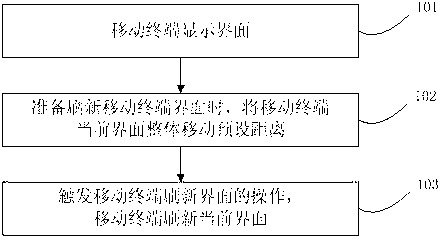
Figure 1
Abstract
Description
technical field
[0001] The invention relates to the technical field of mobile terminals, in particular to a method for refreshing an interface. Background technique
[0002] With the development of mobile terminal technology and mobile Internet technology, mobile terminals have become an indispensable personal electronic device in people's lives. People use mobile terminals to obtain information, work and entertainment.
[0003] In order to facilitate the use of users, the display function of mobile terminals has been greatly enhanced. The current development trend of mobile terminals is that there are fewer and fewer physical buttons, and more virtual buttons are displayed on the touch screen, which can increase the size of the display screen and expand the one-time reading. content. However, due to the portability requirements of mobile terminals, the screen size is greatly limited. It is often difficult to display all the content of an interface, especially a web page, o...
Examples
Embodiment Construction
[0016] The technical solutions of the present invention will be further described below in conjunction with the accompanying drawings and through specific implementation methods.
[0017] figure 1 It is a flow chart of interface refreshing in the specific embodiment of the present invention. Such as figure 1 As shown, the interface refresh process applicable to mobile terminals includes the following steps:
[0018] Step 101, the mobile terminal displays an interface, which is the current interface.
[0019] Step 102, when preparing to refresh the interface of the mobile terminal, move the current interface of the mobile terminal by a preset distance as a whole.
[0020] In order not to conflict with other mobile terminal operations, it can be defined to keep pressing the touch screen of the mobile terminal for a preset period of time (for example, 3 seconds) to indicate that the entire current interface is selected, then drag the current interface to a certain distance, an...