
Display content amplification control method and device and mobile terminal
A technology for displaying content and zooming in on displays, applied in instruments, calculations, electrical digital data processing, etc., can solve problems such as inability to zoom in quickly and accurately
- Summary
- Abstract
- Description
- Claims
- Application Information
AI Technical Summary
Problems solved by technology
Method used
Image

Examples
Embodiment Construction
[0014] Hereinafter, the present invention will be described in detail with reference to the drawings and examples. It should be noted that, in the case of no conflict, the embodiments in the present application and the features in the embodiments can be combined with each other.
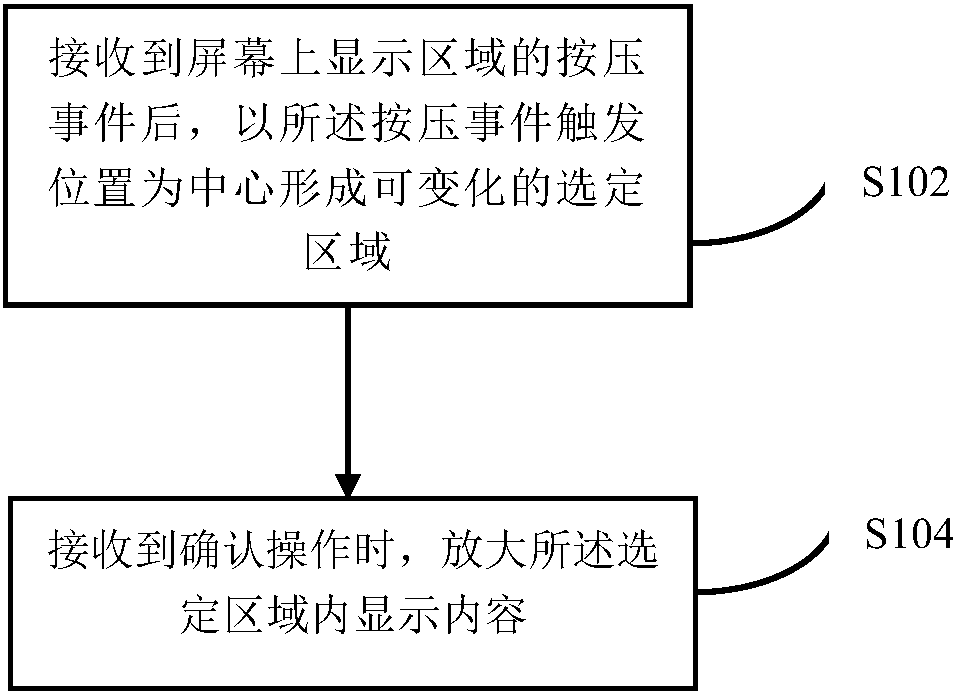
[0015] In this embodiment, a method for controlling enlarged display content is provided, figure 1 is a flowchart of a method for controlling enlarged display content according to an embodiment of the present invention, such as figure 1 As shown, the process includes the following steps:
[0016] S102: After receiving the press event of the display area on the screen, form a variable selected area centered on the trigger position of the press event;
[0017] S104: Enlarge the displayed content in the selected area when the confirmation operation is received.
[0018] By sensing the press event, it is possible to accurately determine the center of the real content that the user wants to zoom in, an...
PUM
 Login to View More
 Abstract
Description
Claims
Application Information
 Login to View More