

Apparatus and method for incorporating tactile control and tactile feedback into a human-machine interface
a human-machine interface and tactile feedback technology, applied in the field of enhanced track pads, can solve the problems of limiting the rate of information transfer between the computer and the human operator, the conventional mouse provides no tactile feedback about, and the inability to provide tactile feedback to the mous
Patent Information
- Authority / Receiving Office
- US · United States
- Patent Type
- Patents(United States)
- Current Assignee / Owner
- Publication Date
- 2007-07-17
- Estimated Expiration
- Not applicable · inactive patent
Smart Images
Figure 1 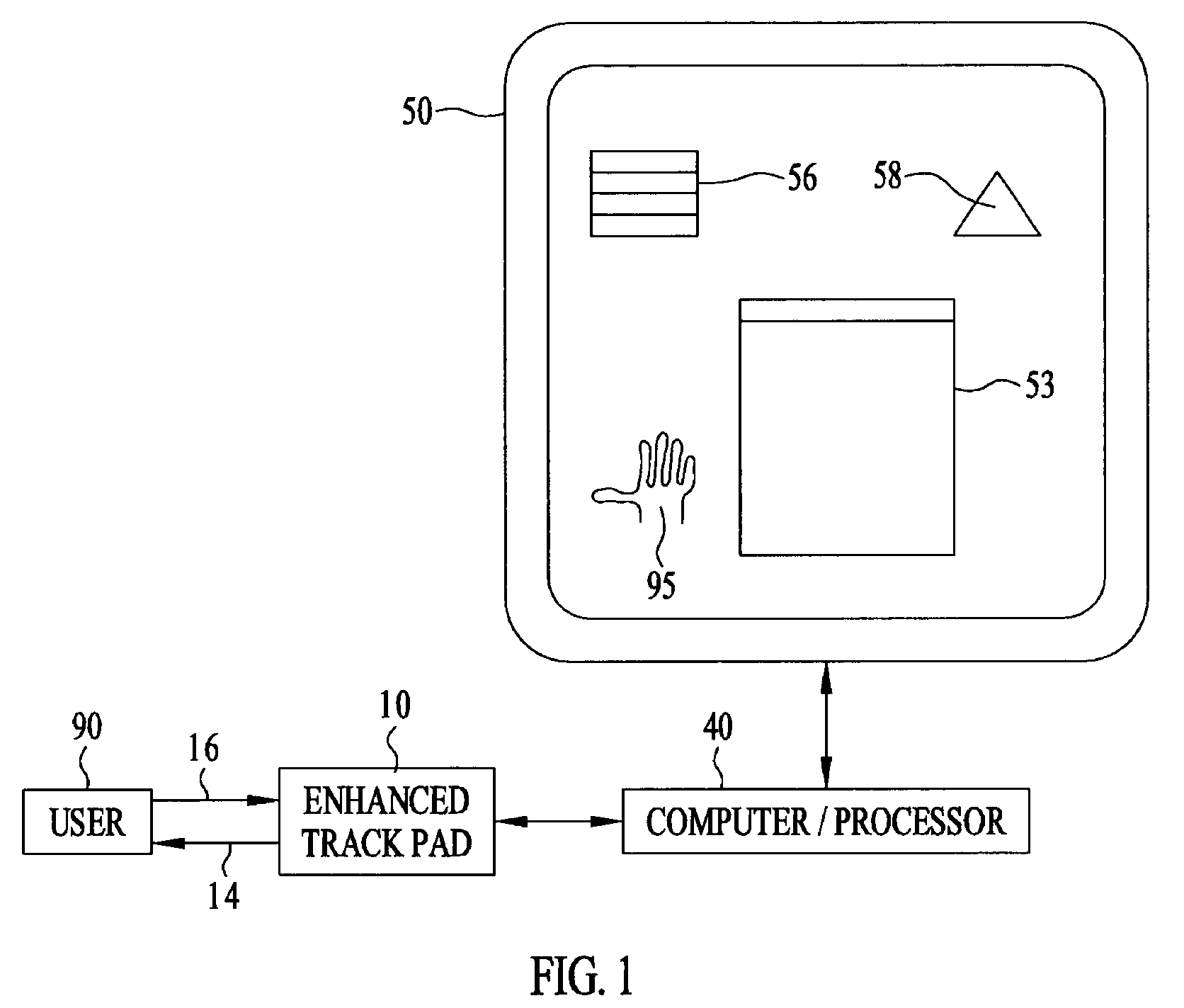
Figure 2 
Figure 3
Abstract
Description
BACKGROUND OF THE INVENTION
[0001] The invention relates generally to human-machine interface devices. More specifically, the invention relates to an enhanced track pad that allows a user to manipulate the graphical elements of a graphical user interface (GUI) and provides tactile feedback to the user.
[0002] Current computer systems allow graphical elements such as windows, icons, and menus to be manipulated through the use of a pointer controlled by a mouse. This interface allows an operator to indicate a single point on the display and to click (or double-click, etc.) one or more buttons on the mouse. The only feedback that the user receives about the success of an intended operation is through the visual display provided by the computer screen.
[0003] Like a conventional track pad, a mouse-controlled pointer provides only an indirect way of manipulating the elements of a GUI. Users cannot move a graphical icon or window directly with their hands, the way they would move a piece of pap...
Examples
Embodiment Construction
[0016]FIG. 1 shows a schematic representation of the enhanced track pad 10 in operation. A user 90 views a video display 50 and provides inputs or commands 16 to the computer or processor 40 through the enhanced track pad 10. The user 90 uses the enhanced track pad 10 to manipulate elements 53, 56, 58 of the graphical user interface (GUI) in a similar fashion as one would use a conventional track pad to operate on the video display's graphical elements. Additionally, the enhanced track pad 10 provides the user 90 with enhanced sensory information about the GUI elements 53, 56, 58 on the display 50, including the relationship between the user's hand and the GUI elements 53, 56, 58. In operation, the user 90 rests his hand on the enhanced track pad 10, and a representation 95 of the user's hand appears on the video display 50. The representation 95 of the user's hand provides additional visual feedback to the user 90 and need not be to scale. Tactile feedback information 14, such as e...