
Touch screen terminal unlocking method and touch screen terminal
A touch screen terminal, touch screen technology, applied in the field of information processing, can solve problems such as boring and reducing user experience, etc.
- Summary
- Abstract
- Description
- Claims
- Application Information
AI Technical Summary
Problems solved by technology
Method used
Image

Examples
Embodiment Construction
[0031] The following will clearly and completely describe the technical solutions in the embodiments of the present invention with reference to the accompanying drawings in the embodiments of the present invention. Obviously, the described embodiments are only some, not all, embodiments of the present invention. Based on the embodiments of the present invention, all other embodiments obtained by persons of ordinary skill in the art without creative efforts fall within the protection scope of the present invention.
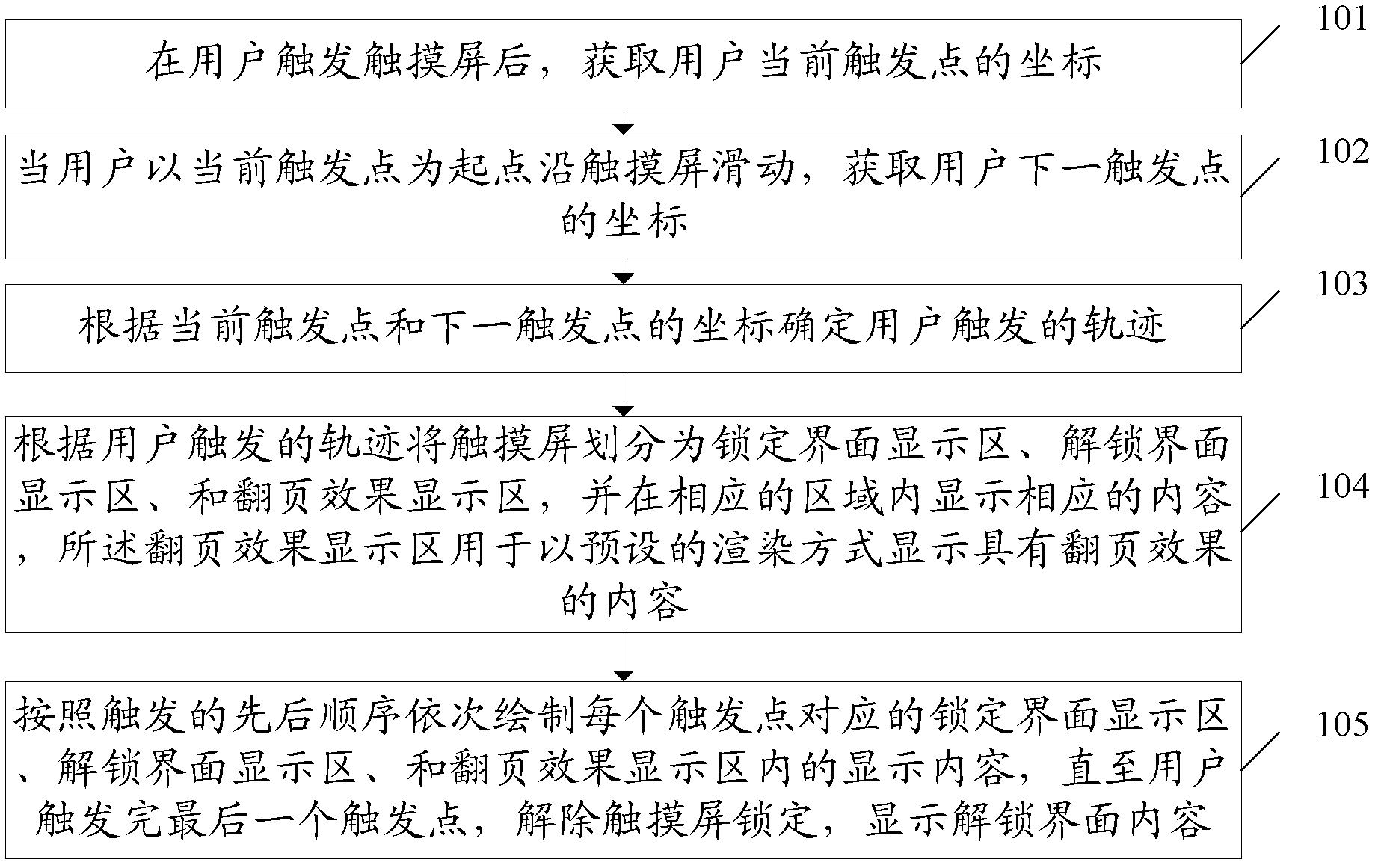
[0032] An embodiment of the present invention provides a method for unlocking a touch screen terminal, such as figure 1 shown, including:
[0033] 101. After the user triggers the touch screen, acquire the coordinates of the user's current trigger point.
[0034] 102. When the user slides along the touch screen with the current trigger point as the starting point, acquire the coordinates of the user's next trigger point.
[0035] For security reasons, the touch s...
PUM
 Login to View More
 Abstract
Description
Claims
Application Information
 Login to View More