
Set top box soft keyboard input method based on input priority and system thereof
An input method and technology for an input system, which are applied in the field of a set-top box soft keyboard input method and system based on input priority, can solve the problems of increasing the time for a user to search for text, slowing down the input speed, inconvenience and the like, avoiding cursor movement operations, Realize the effect of input function and fast input function
- Summary
- Abstract
- Description
- Claims
- Application Information
AI Technical Summary
Problems solved by technology
Method used
Image

Examples
Embodiment Construction
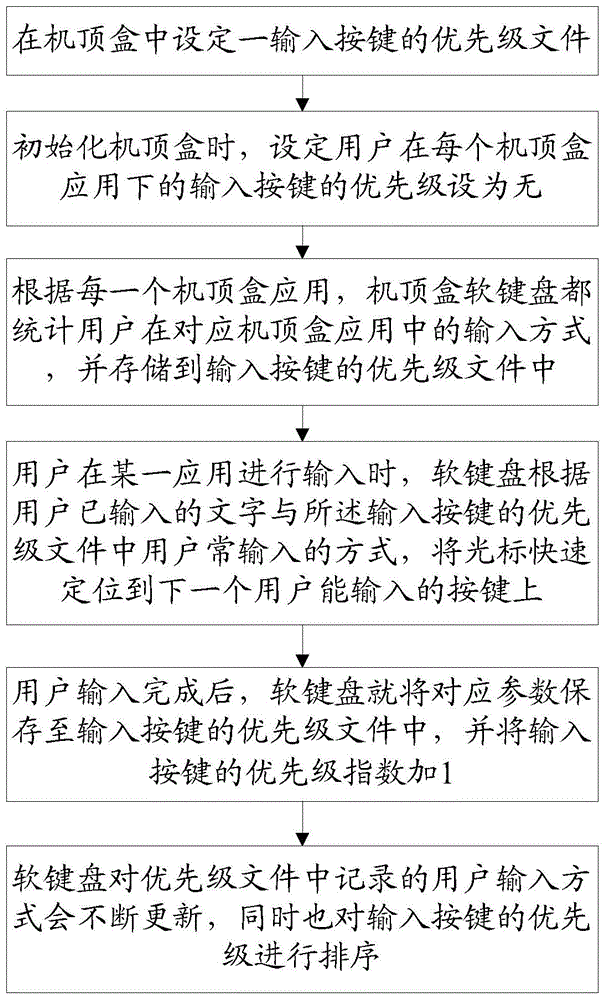
[0025] see figure 1 Shown, a kind of set-top box soft keyboard input method based on input priority of the present invention comprises the steps:
[0026] Step 10, set the priority file of an input button in the set-top box;
[0027] Step 11. When initializing the set-top box, set the priority of the user's input button under each set-top box application to be none.
[0028] Step 20. According to each set-top box application, the soft keyboard of the set-top box counts the user's input methods in the corresponding set-top box application, and stores them in the priority file of input keys; for example: the user uses the soft keyboard under application A to input the program name, The soft keyboard is displayed in the common "QWE" full-key form, while getting rid of individual illegal (application not allowed, the user can not input) text keys, waiting for the user to input.
[0029] Step 30, when the user is inputting in a certain application, the soft keyboard quickly posit...
PUM
 Login to View More
 Abstract
Description
Claims
Application Information
 Login to View More