
Countdown setting method and device
A countdown and clock technology, which is applied in the field of countdown setting method and device, can solve the problems of cumbersome operation and not intuitive enough in the countdown setting method, and achieve the effect of simple and easy setting process
- Summary
- Abstract
- Description
- Claims
- Application Information
AI Technical Summary
Problems solved by technology
Method used
Image

Examples
Embodiment Construction
[0026] Hereinafter, the present invention will be described in detail with reference to the accompanying drawings and in conjunction with embodiments. It should be noted that the embodiments in the present application and the features of the embodiments may be combined with each other in the case of no conflict.
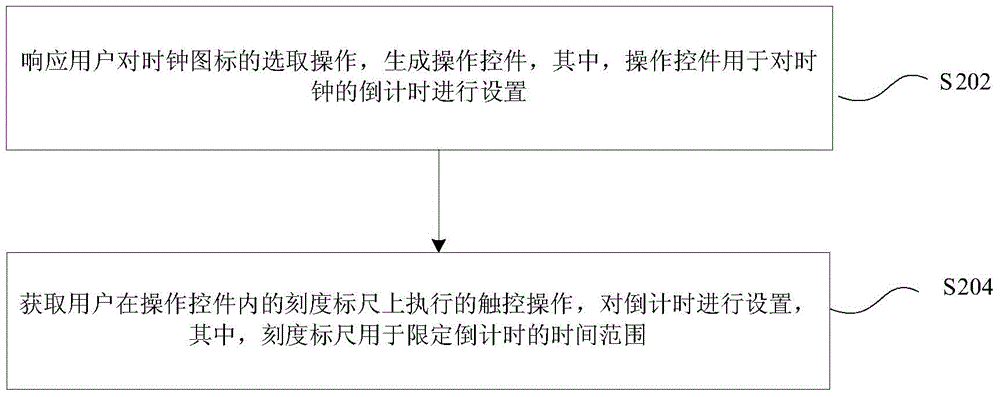
[0027] figure 2 It is a flowchart of a method for setting a countdown according to an embodiment of the present invention. like figure 2 As shown, the method may include the following processing steps:
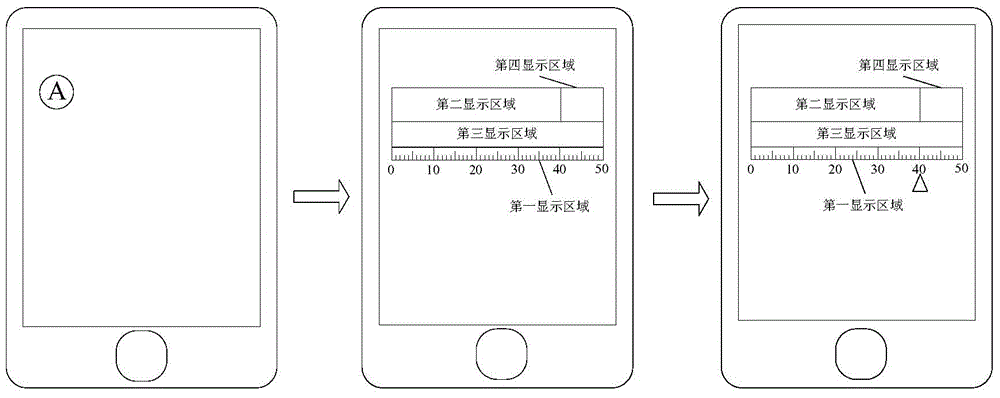
[0028] Step S202: In response to the user's selection operation on the clock icon, an operation control is generated, wherein the operation control is used to set the countdown of the clock;
[0029] Step S204: Acquire the touch operation performed by the user on the scale scale in the operation control, and set the countdown, wherein the scale scale is used to limit the time range of the countdown.
[0030] The countdown setting method on the smart terminal in...
PUM
 Login to View More
 Abstract
Description
Claims
Application Information
 Login to View More