
Selective muting of applications
a technology of application and selective muting, applied in the field of computer applications, can solve problems such as the lack of volume control in certain aspects
- Summary
- Abstract
- Description
- Claims
- Application Information
AI Technical Summary
Benefits of technology
Problems solved by technology
Method used
Image

Examples
Embodiment Construction
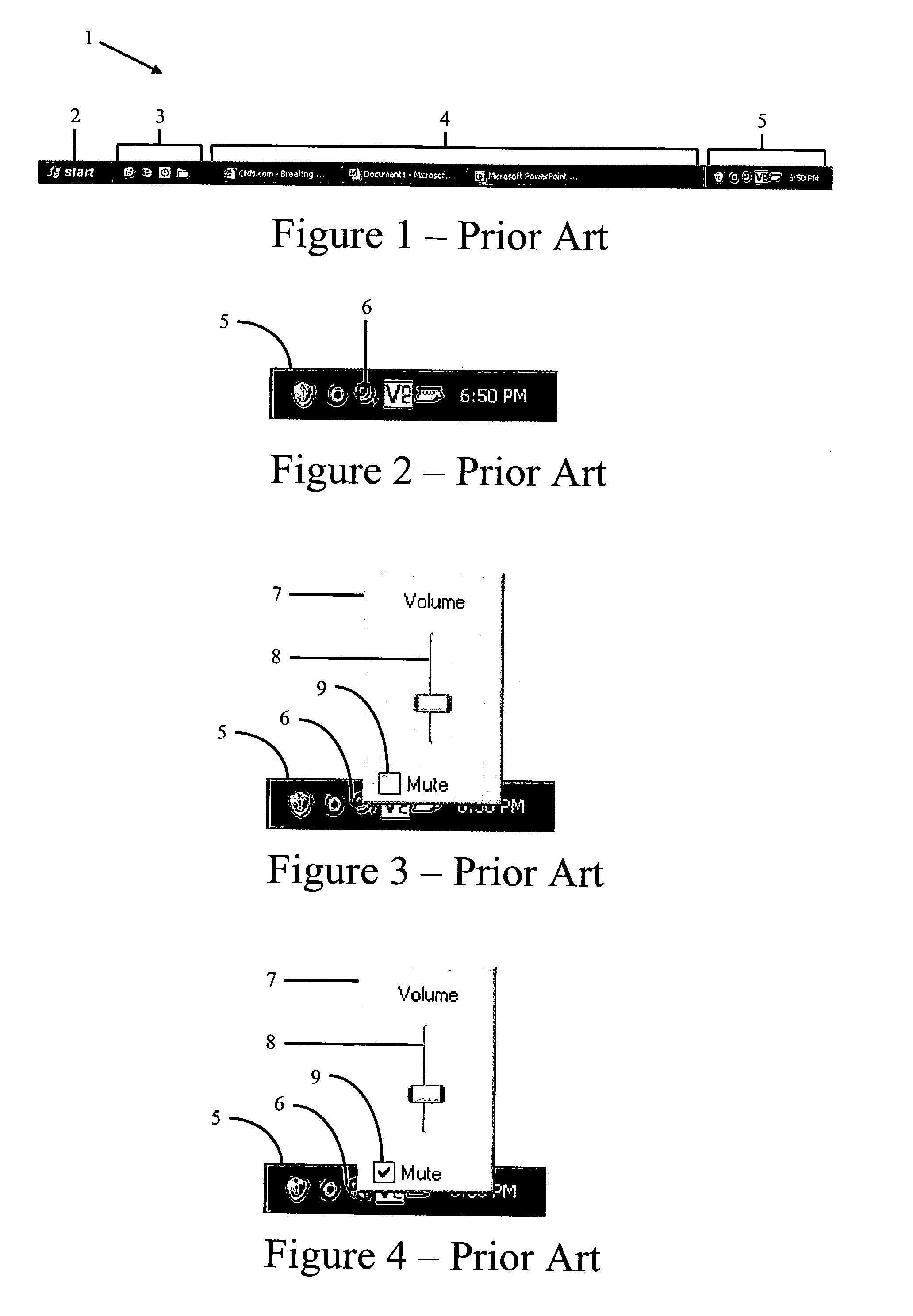
[0035] Before proceeding with exemplary embodiments, it is beneficial to describe in further detail problems with conventional electronic devices. In the examples that follow, portions of a conventional OS on an electronic device of a computer system will be described, then problems with the conventional OS will be described.
[0036]FIG. 1 shows a taskbar 1 of a Windows XP operating system. The taskbar 1 comprises four sections: a start menu button 2, a quick launch bar 3, a programs region 4, and a systray 5. The start menu button 2, when left-clicked, opens the start menu for a user. The quick launch bar 3 enables a user to launch applications by left-clicking on the appropriate icon in the quick launch bar 3. The applications region 4 comprises buttons showing which, if any, applications are currently running. The systray 5 displays small icons enabling a user to know what is currently loaded in the computer's memory. These icons may include an icon for a system volume dialogue. T...
PUM
 Login to View More
 Abstract
Description
Claims
Application Information
 Login to View More