
Selectable parent and submenu object display method with varied activation area shape
a display method and submenu object technology, applied in the direction of instruments, electric digital data processing, input/output processes of data processing, etc., can solve the problems of affecting navigation performance, affecting menu navigation, and affecting the shape and so as to achieve optimal balance between the width, the shape and the size of the activation area
- Summary
- Abstract
- Description
- Claims
- Application Information
AI Technical Summary
Benefits of technology
Problems solved by technology
Method used
Image

Examples
first embodiment
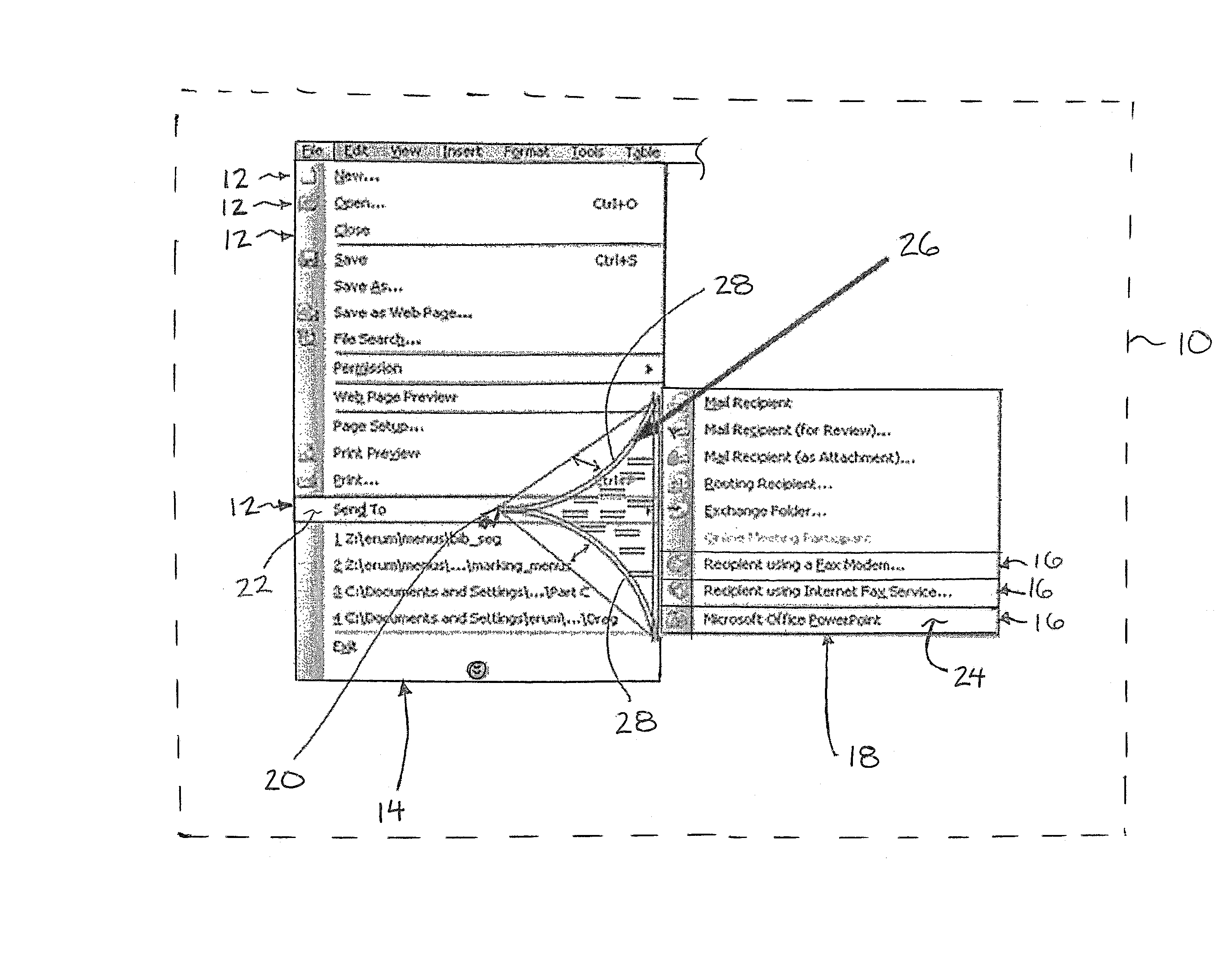
[0093]Turning now to the first embodiment, the method of displaying the selectable objects in the display includes an additional override function using the click function of the pointing device to hide the sub-menu displayed even while the cursor remains in contact with the activation area associated with that sub-menu. In this instance, the cursor is aligned with an adjacent one of the parent menu objects which is overlapped by the activation area as the click function is executed to result in the current sub-menu and associated activation area being hidden so that the sub-menu and new activation area of the sub-menu associated with the adjacent parent menu object overlapped by the cursor can be displayed.
second embodiment
[0094] as shown in FIG. 15 a variation of the override function for hiding the sub-menu in the display while the cursor remains in contact with the activation area is described. In this instance positioning of the cursor over an adjacent parent menu object different from the parent menu object with which the activation area and sub-menu are associated with causes a hover icon 30 to be displayed in overlapping configuration with that adjacent parent menu object. In this instance, aligning the cursor in contact or in overlapping configuration with the hover icon and maintaining the cursor in fixed position in contact with the hover icon for a prescribed duration causes the override function to be enabled. Accordingly the new sub-menu and new activation area of the adjacent parent menu object associated with the hover icon can then be displayed.
[0095]Turning now to FIG. 24, a further embodiment of the activation area is shown in which the two opposing side edges 28 remain diverging fro...
third embodiment
[0096]The third embodiment is also distinguished in that the position of the first end of the activation area and accordingly the size of the activation area is determined by the cursor position each time the activation area is displayed. In particular, the first end of the activation area is positioned to be spaced from the cursor in the working direction towards the second end at the sub-menu. The space between the cursor and the first end of the actuation area typically comprises the distance of just a few pixels of the display which corresponds approximately to an overall width of the cursor shown in the display.
[0097]In some instance, the shape and size of the activation area may vary as the cursor is displaced towards the submenu. In particular, it may be desirable for the apex at the first end to be displaced towards the submenu together with forward movement of the cursor towards the submenu to reduce the size of the activation area in response to forward movement. In this i...
PUM
 Login to View More
 Abstract
Description
Claims
Application Information
 Login to View More