

Mobile terminal and method for displaying floating sign thereof
A mobile terminal and logo display technology, which is applied in the fields of instruments, calculations, electrical digital data processing, etc., to achieve the effect of facilitating user operations, reducing visual barriers, and enhancing interactive relationships
- Summary
- Abstract
- Description
- Claims
- Application Information
AI Technical Summary
Problems solved by technology
Method used
Image

Examples
Embodiment Construction
[0033] The specific implementation manners of the mobile terminal and the method for displaying the floating logo provided by the present invention will be described in detail below in conjunction with the accompanying drawings.
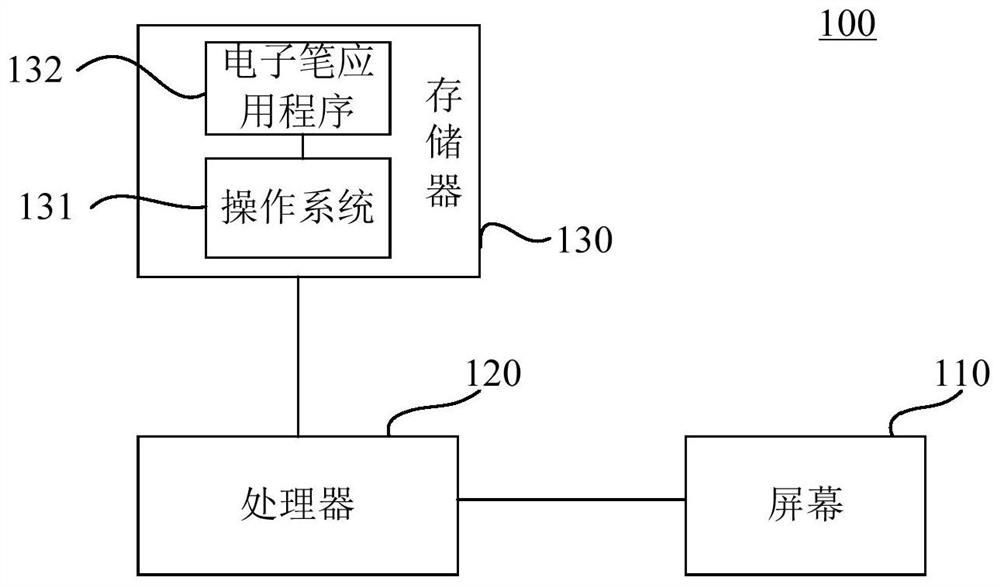
[0034] Please refer to figure 1 , is a schematic structural diagram of a mobile terminal according to a specific embodiment of the present invention.
[0035] The mobile terminal 100 includes a screen 110 , a processor 120 and a memory 130 .
[0036] The screen 110 is a touch screen, which may be an LCD, LED or OLED screen and the like. It is used to provide users with a visual interactive interface. The screen 110 is used to display icons, photos, videos, etc., and the user can perform input operations on the mobile terminal 110 by touching the screen 110 with a finger or by using an electronic pen instead of a finger.
[0037] The memory 120 is used to store operating systems, application programs, user documents, pictures and other files instal...
PUM
 Login to View More
 Abstract
Description
Claims
Application Information
 Login to View More