
SQLite visual management method
A management method and code technology, applied in the field of SQLite visual management, can solve problems such as hindering development, reducing development efficiency, and program generation problems, and achieving the effect of reducing maintenance costs, speeding up development progress, and improving productivity
- Summary
- Abstract
- Description
- Claims
- Application Information
AI Technical Summary
Problems solved by technology
Method used
Image

Examples
Embodiment Construction
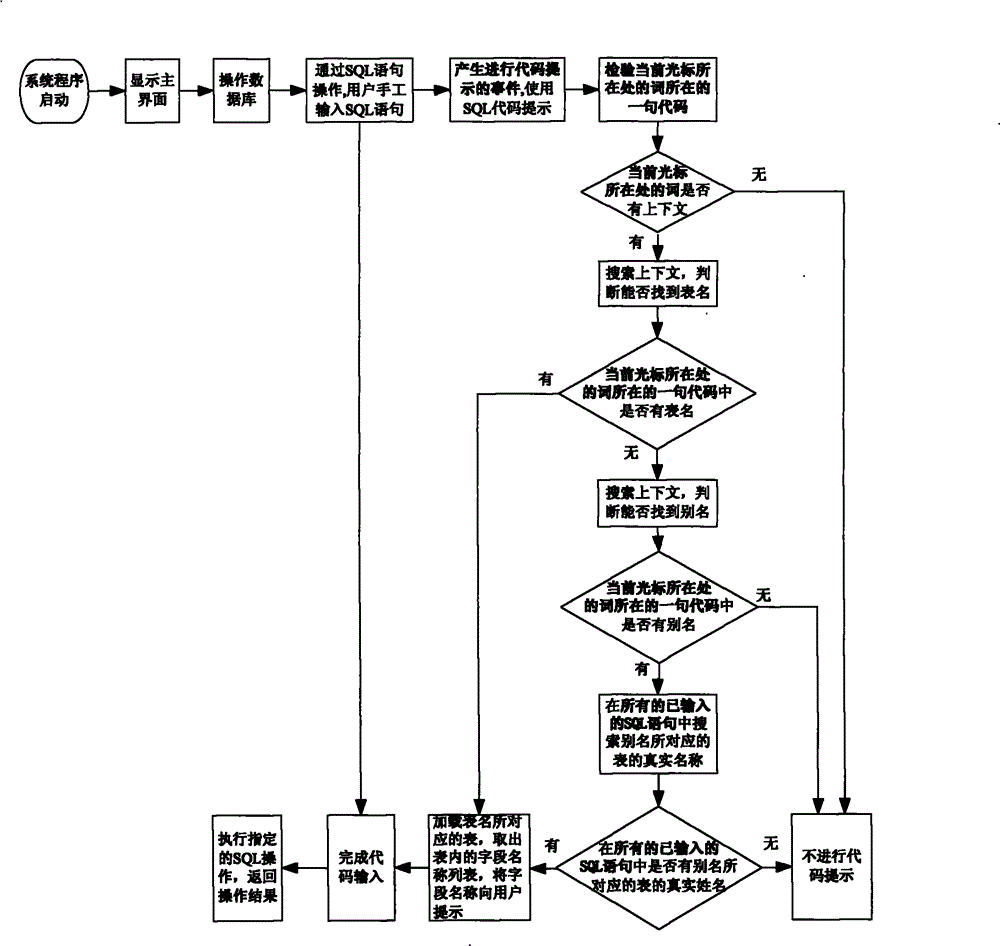
[0033] One embodiment of the SQLite visual management method of the present invention is as follows: figure 1 As shown, the SQLite visual management tool software is started, and after entering the operation database, code prompts can be performed, and the code prompts include the following steps:
[0034] 1. Through the SQL statement operation, the user enters the SQL code;
[0035] 2. After the event for code prompting is generated, check the sentence of code at the word where the current cursor is located;
[0036] 3. Determine whether the word where the current cursor is located has a context. The context refers to the word before or after a word in a code, such as the code "select*from Table", then the word "from" above It is "select", and the following is "table"; if the word where the current cursor is located has no context, no code prompt will be performed; if the word where the current cursor is located has context, go to step 4;
[0037] 4. Search the context to d...
PUM
 Login to View More
 Abstract
Description
Claims
Application Information
 Login to View More