
Overlapped handwriting input method
a handwriting input and handwriting technology, applied in image analysis, image enhancement, instruments, etc., can solve the problems of low efficiency of character handwriting input, method is still limited by the size of the touch screen, and user cannot input continuous handwriting according to the user's natural writing practice, etc., to improve the efficiency of handwriting input
- Summary
- Abstract
- Description
- Claims
- Application Information
AI Technical Summary
Benefits of technology
Problems solved by technology
Method used
Image



Examples
embodiment 1
[0072]A device for implementing the patent of the present invention may be a smart phone having a touch screen (for example, an HTC / Google Nexus One smart phone), where the phone has a touch screen and is capable of collecting the track of strokes written by the user through a finger. The present invention can be well implemented by using various processing programs edited using the C++ language. The present invention may also be implemented on another mobile electronic device such as a tablet computer, a personal digital assistant (PDA), and a UPS terminal; the present invention may also be implemented by using another programming language such as C and Java.
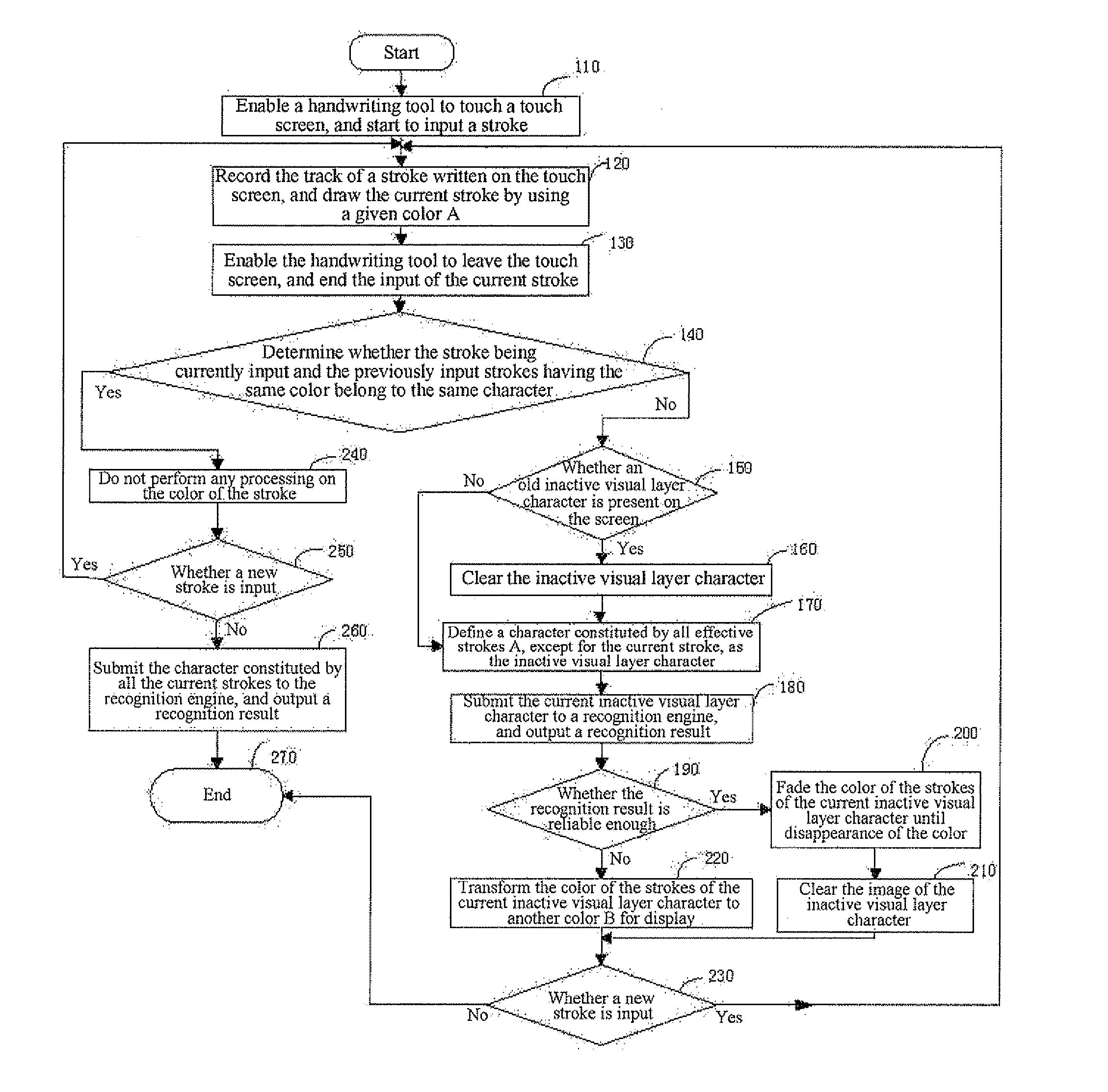
[0073]Referring to FIG. 3, the present invention provides an overlapped handwriting input method, which comprises the following steps.
[0074][Step 100] Starting, and performing initialization process: clearing the screen, and clearing an inactive visual layer character.
[0075][Step 110] touching the touch screen with a handwritin...
embodiment 2
[0105]This embodiment discloses an overlapped handwriting input method, which comprises the following steps:
[0106]Step S111: Touching a touch screen through a touch unit, and starting to input a stroke;
[0107]Step S112: Moving the touch unit on the touch screen, recording and displaying the track of a stroke on a handwriting area of the touch screen, and drawing the track of the current stroke using a given color A;
[0108]Step S113: Moving the touch unit away from the touch screen, and ending the input of the current stroke;
[0109]Step S114: Determining whether the stroke being currently written and all previously input strokes having the color A belong to a same character; if yes, keeping the color of the current stroke unchanged; otherwise, going to Step S115;
[0110]Step S115: Determining whether an inactive visual layer character is present on the screen, wherein the inactive visual layer character refers to the last completely written character that has undergone recognition and col...
PUM
 Login to View More
 Abstract
Description
Claims
Application Information
 Login to View More