Simulative operation system human-computer interaction implementation method based on browser

An operating system and human-computer interaction technology, applied in the field of browser-based imitation operating system human-computer interaction implementation, can solve problems such as unintuitive operation, needing page refresh, slow response speed, etc., and achieve low hardware configuration requirements and intuitive display. and operation, interactive and flexible effects

CN1790339AInactive Publication Date: 2006-06-21WUXI EVERMORE SOFTWARE
0 Cites 16 Cited by

Patent Information

Authority / Receiving Office
CN · China
Patent Type
Applications(China)
Current Assignee / Owner
Publication Date
2006-06-21
Estimated Expiration
Not applicable · inactive patent

Smart Images

  • Figure 1
    Figure 1
  • Figure 2
    Figure 2
  • Figure 3
    Figure 3
Patent Text Reader

Abstract

The invention discloses a person-set mutual realization method of operation system emulation based on scanner, which comprises the following steps: (1) the customer sets the page through the network to connect server and scanner to enroll the server; (2) the scanner reads and operates the customer table program; the network table is established in the scanner; (3) the scanner downloads the mutual program and allocation data in the setting page; (4) the customer end analyzes the allocation data; (5) the mutual program reads the allocation data, which establishes the table manager; (6) the table manager establishes and allocates the table mutual element. The table mutual element contains speed pattern object, window object, task column and task column button object. The invention displays strong mutual function without any limit and refreshing the page, which improves the mutual function to the maximum limit.
Need to check novelty before this filing date? Find Prior Art

Description

technical field

[0001] The present invention relates to a browser-based imitation operating system human-computer interaction implementation method, in particular to a method for creating an interactive interface for generating network desktops, shortcut objects, taskbars, taskbar button objects, and window objects within a browser and how to do it. Background technique

[0002] The widespread use of computers has made the individual needs of modern society more and more intense. Personal computer users operate a certain computer for a long time, configure special software, manage files in the way they are used to, and set up desktops and appearances that meet their personal preferences. Therefore, more and more users rely on their computers at work. Software Environment. In actual work and life, users often need to work alternately on the company computer and the home computer, and sometimes need to perform computer operations in offices outside the company or even in Int...

Examples

Embodiment Construction

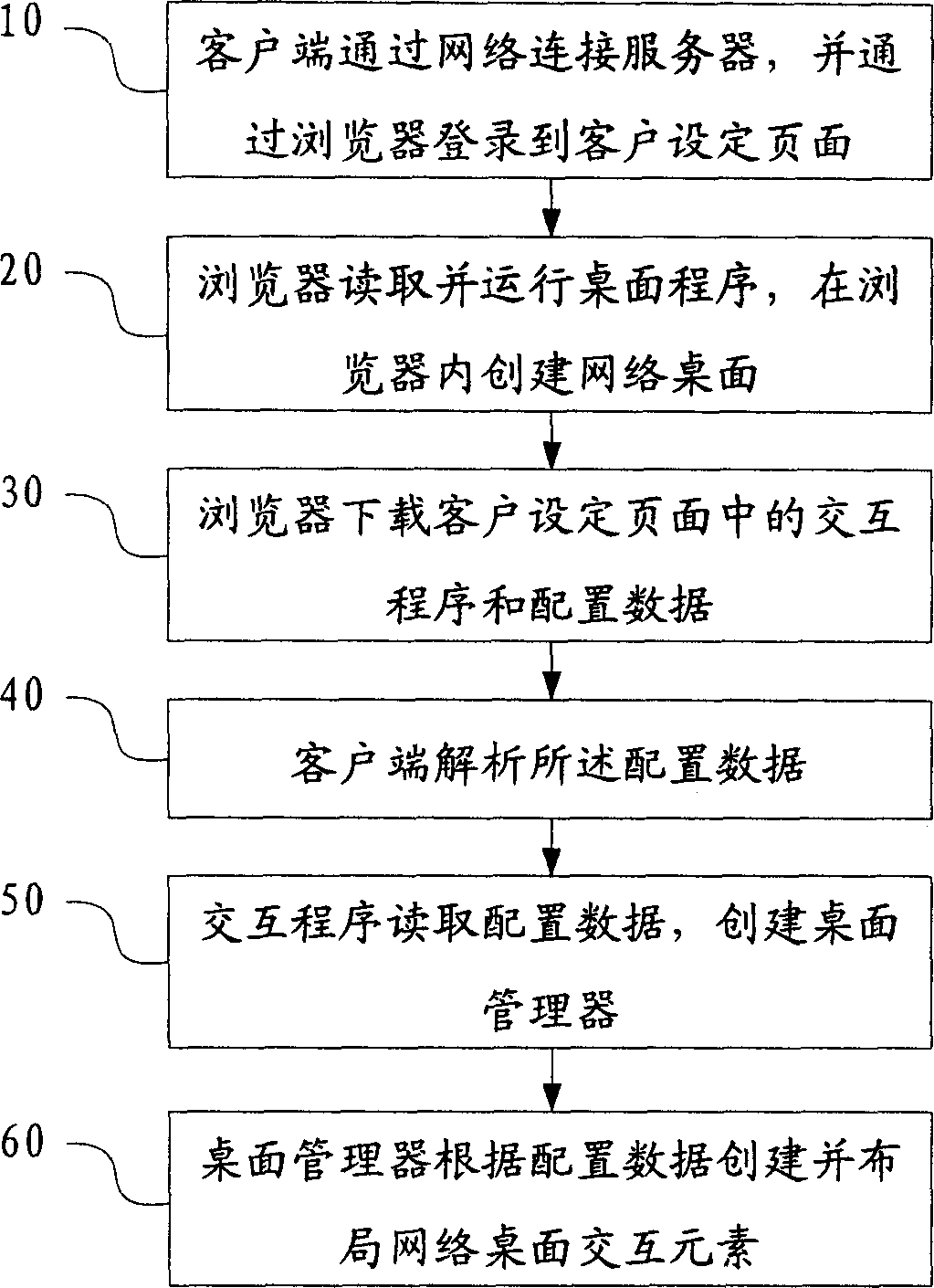
[0054] figure 1 Generate the flow chart of imitation operating system human-computer interaction interface in browser for the present invention, comprise:

[0055] Step 10, the client connects to the server through the network, and logs in to the client setting page set in the server through a browser;

[0056] Step 20, the browser reads and runs the desktop program in the client setting page, and creates a web desktop in the browser;

[0057] Step 30, the browser downloads the interactive program and configuration data in the client setting page;

[0058] Step 40, the client parses the configuration data;

[0059] Step 50, the interactive program reads the configuration data and creates a desktop manager;

[0060] Step 60, the desktop manager creates and layouts the interactive elements of the network desktop according to the configuration data.

[0061] In the above technical solution, the client refers to any client or client cluster configured with a network interface ...