
Method and device for rapidly loading Activity data for Android system
A fast and data technology, applied in the direction of program control device, program loading/starting, etc., can solve problems such as delayed loading of Activity data
- Summary
- Abstract
- Description
- Claims
- Application Information
AI Technical Summary
Problems solved by technology
Method used
Image

Examples
specific Embodiment
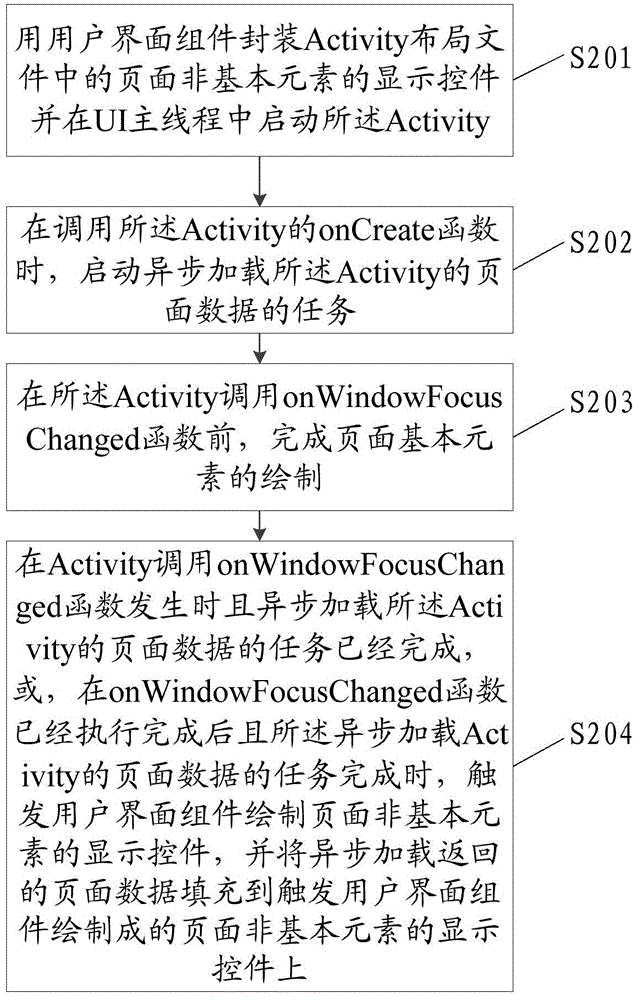
[0054] Such as figure 2 As shown, it is a schematic flow diagram of a method for fast loading Activity data on the Android system of this application. The method includes the following steps:
[0055] Step S201: Use the user interface component to encapsulate the display controls of the page non-basic elements in the Activity layout file and start the Activity in the UI main thread.
[0056] The basic elements of the page are part or all of the page frame elements. The non-basic elements of the page are page elements other than the basic elements of the page. The user interface component is capable of controlling the layout of the component and will be rendered into the main interface when needed. If the user interface component is not used to encapsulate the display controls of the non-basic elements of the page, the Android system can choose the drawing timing by itself.
[0057] By using the user interface component to encapsulate the display controls of the non-basic elements...
PUM
 Login to View More
 Abstract
Description
Claims
Application Information
 Login to View More