Input keyboard of touch screen
A technology of touch screen and keyboard, which is applied in the field of touch screen text input, can solve the problems that cannot meet the needs of smart device text input, and achieve the effect of satisfying diversified input methods and fast and convenient input
- Summary
- Abstract
- Description
- Claims
- Application Information
AI Technical Summary
Problems solved by technology
Method used
Image

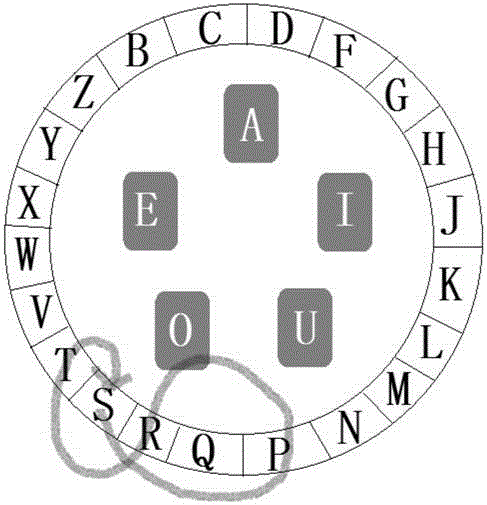


Examples
Embodiment 1
[0044] Embodiment 1: Input English "sports", such as image 3 As shown, first press and select the s key with your finger, and slide to the p key through the periphery of the outer ring keyboard, then slide your finger to the o key of the circular keyboard, and then slide to the r, t, and s keys of the outer ring keyboard, and select the key by sliding Realize the combination of English letters to complete the word input.
Embodiment 2
[0045] Embodiment 2: Input English "airplane", such as Figure 4 As shown, first press the select a key of the circular keyboard with your finger, and slide directly to the i key (1), press and hold the i key with your finger to start rotating the circular keyboard to the letter r of the outer ring keyboard, and then slide to the r key (2); if Figure 5 As shown, then the finger slides towards the p and l keys (3) on the periphery of the outer ring keyboard, as Figure 6 The shown finger slides to the a key (4) of the circular keyboard; then slides to the n key (5); as Figure 7 The shown finger drags the outer ring keyboard again to rotate to the circular keyboard letter e and slides to the e key (6), and realizes the combination of English letters by sliding to select the key to complete the word input.
Embodiment 3
[0046] Embodiment 3: use the pinyin "guang" to input the Chinese character "广", such as Figure 8 As shown, first press and hold the g key with your finger and drag the outer ring keyboard to rotate to the circular keyboard letter u (1); Figure 9 As shown, the finger slides from the g key to the u key and the a key (2); as Figure 10 As shown, then the finger slides to the n key (3), and finally slides to the g key (4), and the pinyin combination is realized by sliding the keys. Select "Guang" in the Chinese character selection box to complete the input.
PUM
 Login to View More
 Abstract
Description
Claims
Application Information
 Login to View More