

Print control apparatus, control method, and non-transitory computer-readable storage medium storing program
a control apparatus and control method technology, applied in the direction of digital output to print units, instruments, computing, etc., can solve the problem of printing printers being registered as default printers, and the printer is registered as an unwanted default printer
- Summary
- Abstract
- Description
- Claims
- Application Information
AI Technical Summary
Benefits of technology
Problems solved by technology
Method used
Image



Examples
first embodiment
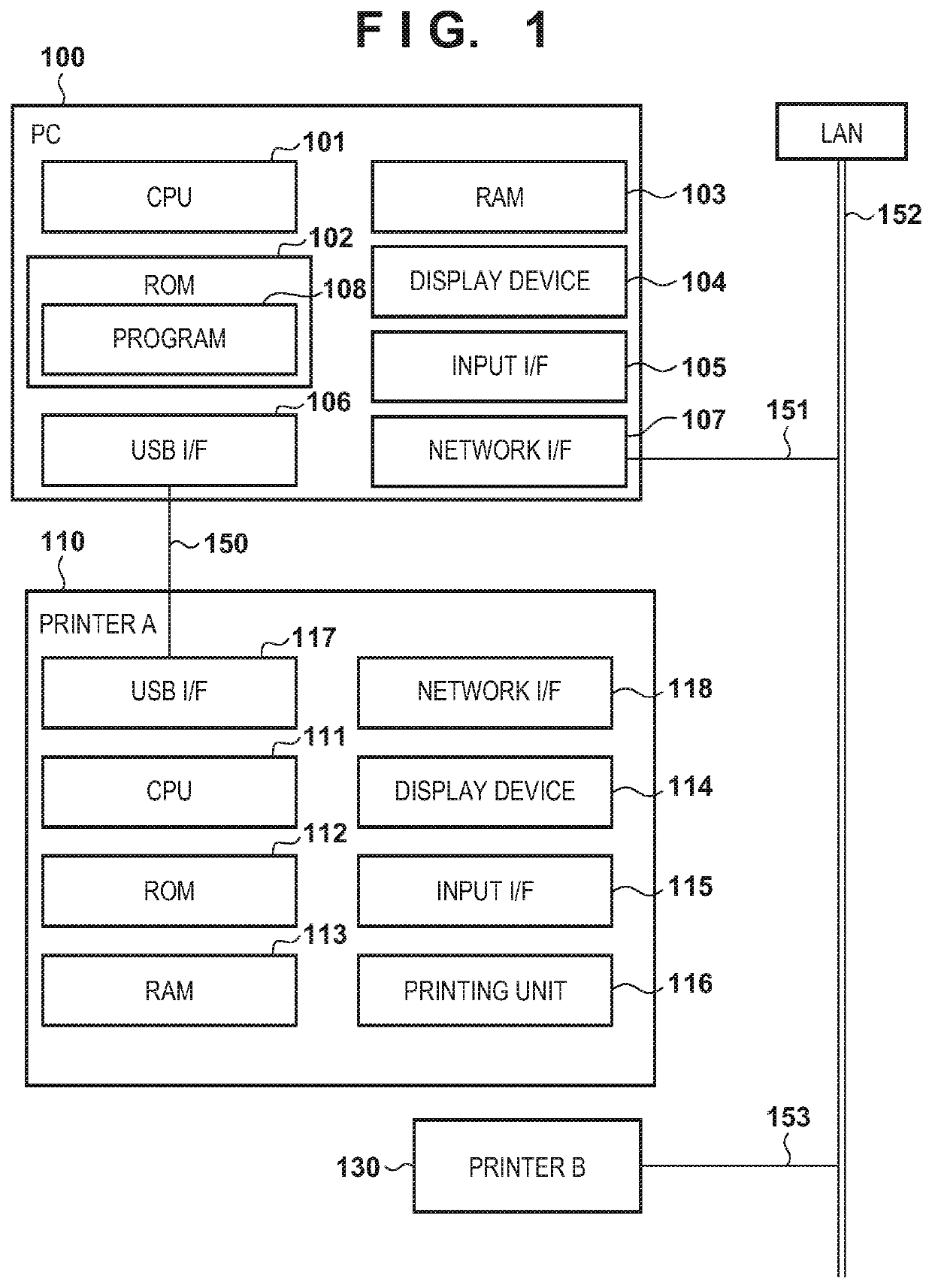
[0020]FIG. 1 is a block diagram showing the configuration of a print system including a PC 100, a printer A 110, and a printer B 130. The PC 100 operates as a print control apparatus for controlling a printer (printing apparatus). The PC 100 includes a CPU 101, a ROM 102, a RAM 103, a display device 104, and an input interface (I / F) 105. The PC 100 also includes a USB I / F 106 and a network I / F 107. However, the PC 100 may be configured to include one of the USB I / F 106 and the network I / F 107. The ROM 102 stores a program 108 such as a printer driver and an installer (both of which will be described later). The PC 100 can communicate with the printer A 110 via a USB cable 150. The PC 100 can also be connected to a LAN 152 via a network connection 151 implemented by an Ethernet cable or Wi-Fi.
[0021]If the printer B 130 can be connected to the LAN 152 via a network connection 153, the PC 100 and the printer B 130 can communicate with each other in the environment of the same LAN 152. ...
second embodiment
[0032]In the second embodiment, the difference from the first embodiment will be described below. In this embodiment, a default printer setting screen 230 shown in FIG. 2D is used instead of the default printer setting screen 210 shown in FIG. 2B.
[0033]The default printer setting screen 230 shown in FIG. 2D will be described. Radio buttons 231, 232, and 233 can be selectively accepted from the user. FIG. 2D shows a state in which the radio button 232 is selected. If the radio button 231 is selected, a printer A 110 registered in FIG. 2A is registered as a default printer. If the radio button 232 is selected, the printer A 110 registered in FIG. 2A is registered as a default printer, and the printing default printer designation function is disabled. If the radio button 233 is selected, the printer A 110 registered in FIG. 2A is not registered as a default printer. When a button 234 is pressed, the installer displays a next screen.
[0034]The processing of disabling the default printer ...
third embodiment
[0041]In the third embodiment, the difference from the first and second embodiments will be described below. In this embodiment, either a default printer setting screen 210 or 230 can be used.
[0042]FIG. 5 is a flowchart illustrating processing of disabling the default printer designation function, which is performed when the user wants to exclude a printer A 110 from a default printer setting. The processing shown in FIG. 5 is implemented when, for example, a CPU 101 reads out a program stored in a ROM 102 into a RAM and executes it. By turning off a checkbox 211 in FIG. 2B or selecting a radio button 233 in FIG. 2D, the installer starts the processing shown in FIG. 5 when displaying a test printing screen 220. When the processing shown in FIG. 5 starts, the installer determines whether the user presses a test printing button 221 (step S501). If it is determined in step S501 that a button 222 is pressed without pressing the button 221, the processing shown in FIG. 5 ends.
[0043]If it...
PUM
 Login to View More
 Abstract
Description
Claims
Application Information
 Login to View More