JavaScript-based method for exporting EXCEL by using HTML table
A table and object technology, applied in the field of JavaScript, can solve the problems of occupying server resources and the server cannot be recycled, and achieve the effect of improving processing efficiency and facilitating subsequent use
- Summary
- Abstract
- Description
- Claims
- Application Information
AI Technical Summary
Problems solved by technology
Method used
Image



Examples
Embodiment Construction
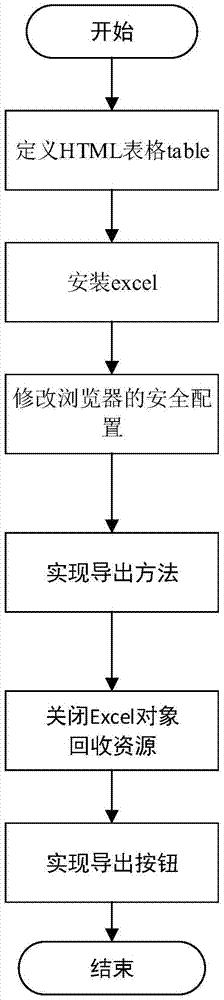
[0020] Such as figure 1 As shown, the present invention adopts the following steps to realize the export of the HTML form to EXCEL.
[0021] Step 1. Define the HTML table;
[0022]
[0023]
[0024] As follows:
[0025]
[0026] Step 2, install excel on the client machine;
[0027] Step 3: Modify the default settings of the browser. The setting method is:
[0028] Tools->Internet Options->Security->Custom Level->Initialize ActiveX Controls without Marked Security Level and set it to Enable;
[0029] Step 4, implement the statement, copy the entire table to EXCEL,
[0030]
[0031]
[0032] Step five, close the execl object, and recycle resources.
[0033]
[0034] The calling method is as follows:
[0035] idTmr = window.setInterval("Cleanup();", 1);
[0036] Step 6: Create an export button on the page and implement the onclick event.
[0037] .
PUM
 Login to View More
 Abstract
Description
Claims
Application Information
 Login to View More