

Chemistry and physics calculator
a calculator and physics technology, applied in the field of calculators, can solve the problems of difficult task, general calculator or graphing calculator is not helpful in this regard, and the difficulty of calculating numbers
- Summary
- Abstract
- Description
- Claims
- Application Information
AI Technical Summary
Benefits of technology
Problems solved by technology
Method used
Image

Examples
example 1
Gas Law Problem
[0074]A sample of gas at 15° C. and 1 atm has a volume of 2.58 L. What volume would this gas occupy at 38° C. and 1 atm?
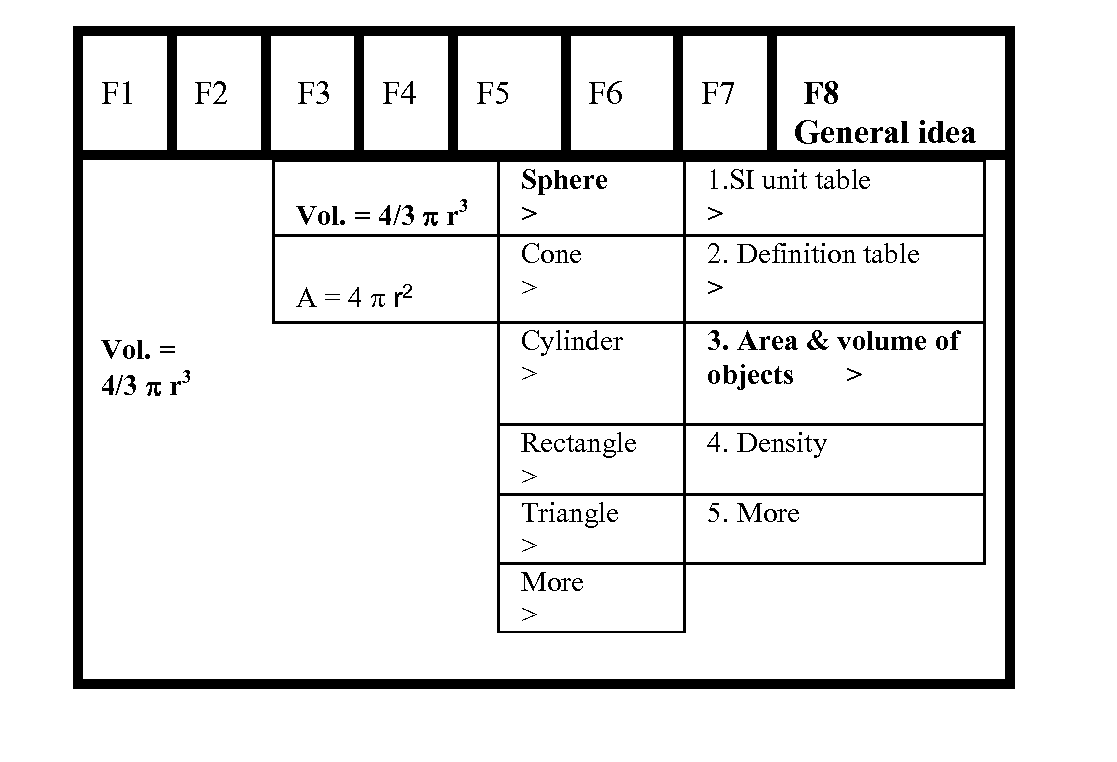
[0075]As shown in FIG. 4-1, a user will begin with F3-Problem to choose “New Problem” if the user has not worked on and saved this problem in the calculator in the past. Other menu choices under F3-Problem may include Old Problem, Insert Problem, Cut Problem, Paste Problem, Delete Problem, New Document, My Document, and Spreadsheet. Navigation among the menu choices F1-F8 can be achieved by pressing the left-right arrow keys on the calculator. The current menu choice will be highlighted in bold, color or shade and will be expanded to show its label, such as Periodic Table for F1, Problem Topic Chemistry for F2, and Problem for F3, etc. Pressing a Select key will select the currently highlighted menu choice, causing the pull down menu thereunder to be displayed. The Select key can be conveniently designed to be the center key among the arrow keys. Alt...
example 2
Stoichiometry Problem
[0083]For the chemical reaction below, if you start with 5 g of methane, how many grams of water will be produced:
CH4(g)+2O2(g)→CO2(g)+2H2O(g)
[0084]The user will select the pull down menu choice “New Problem” from F3 Problem. The label for F3 changes to Equation. The user then selects “Linear Eqn.” from F3 Equations. The menu choice F2 PTC becomes highlighted, and the user presses the up and down arrows to navigate among the pull down menu choices under F2, as shown in FIG. 5-1. The user selects “1. Balancing equations,” and the calculator displays the lower level sub-menu choices “1. Enter the reactants and the charge, state >,”“2. Enter the products and the charge, state >,”“3. Forward reaction one arrow,”“4. Reverse reaction one arrow,” and “5. Equilibrium reaction two arrows.” Here, the user selects “1. Enter the reactants, the charge, and state >.” The user is then able to enter the chemical equation using the alphanumeric keypad on the calculator.
[0085]As ...
example 3
Equilibrium Problems
[0099]At a certain temperature, 4.0 mol of NH3 is introduced into a 2.0 L container, and the NH3 is partially dissociated by the reaction: 2NH3 ((g))N2 ((g))+3H2 ((g)). At equilibrium 2.0 mol of NH3 remains. What is the value of K for the reaction?
[0100]The user should be able write the equation and balance it first, in other words the user will go to a list of molecular formulas and select the reactants and products and set up the chemical equation.
[0101]The user will enter the K expression from the equation as follows:
K=[N2][H2]3 / [NH3]2
[0102]The calculator recognizes the bracket, [ ] as moles per liter concentration unit or other concentration units.
[0103]The user will set up an ICE table, (Initial, Change, and Equilibrium table) by pressing the right key on the keyboard, maybe {ICE}.
[0104]The values will be entered in the ICE table and the K calculated by substituting the values on the K expression. User first would have to solve for x without the calculator ...
PUM
 Login to View More
 Abstract
Description
Claims
Application Information
 Login to View More