[0005] However, the traditional role-based user
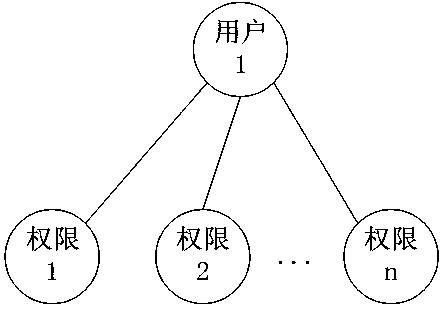
rights management methods all adopt the "role-to-user one-to-many" association mechanism. / Position / Type of work and other concepts, the authorization of user rights under this association mechanism is basically divided into the following three forms: 1. figure 1 As shown, directly authorizing users has the disadvantages of heavy
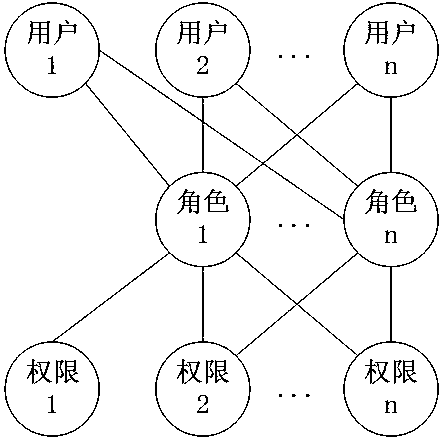
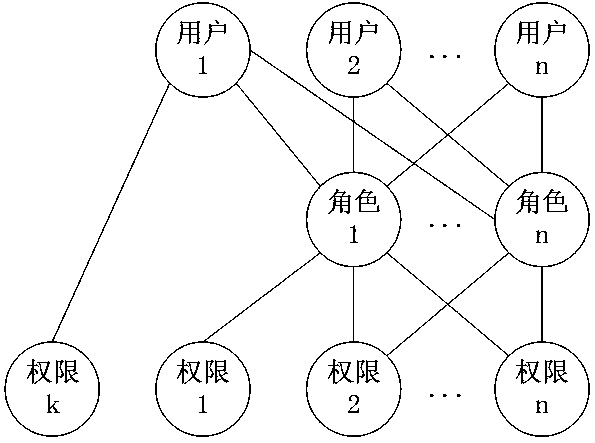
workload, frequent and cumbersome operations; 2. figure 2 As shown, authorize the role (category / group / position / type of work) (a role can be associated with multiple users), and the user obtains the authority through the role; 3. For example image 3 As shown, the combination of the above two methods
[0006] In the above statement, both 2 and 3 need to authorize the role of class / group nature, but the way of authorization through the role of class / group / post / work type has the following disadvantages: 1. The operation is difficult when the user authority changes: In the actual system use, it is often necessary to adjust the user's permissions during the operation process. For example, when dealing with changes in employee permissions, the permissions of an employee associated with a role change. We cannot Changes to change the permissions of the entire role, because the role is also associated with other employees whose permissions have not changed
The above two
processing methods not only take a long time to authorize the role in the case of many role permissions, but also are prone to mistakes. The operation of the user is cumbersome and troublesome, and it is also easy to make mistakes and cause losses to the system user.
[0007] 2. It is difficult to remember the specific permissions contained in the role for a long time: If the role has many permission function points, it is difficult to remember the specific permissions of the role over time, and it is even more difficult to remember the permission differences between roles with similar permissions. To associate a new user, it is impossible to accurately determine how to choose the association
[0008] 3. Due to the change of user permissions, more and more roles will be created (if no new roles are created, the direct authorization to users will be greatly increased), and it is more difficult to distinguish the specific differences between the permissions of each role
[0009] 4. When transferring a post, if you want to assign many permissions of the transferred user to several other users, you must distinguish these permissions of the transferred user during
processing, and then create roles to associate with the other users. users, such an operation is not only complicated and time-consuming, but also prone to errors
[0010] like Figure 4 As shown, in the authorization methods of the existing forms, if you select two or more employees and then select a form, the authorization status of the selected employees to the selected form cannot be displayed; similarly, if you select a form , and then select two or more employees, the authorization status of the selected employees for the selected form cannot be displayed
Makes it easy for the authorized operator to make mistakes when authorizing multiple users at the same time
[0011] During the use of the system, permissions are often adjusted due to management needs; for example, according to management needs, the company now needs to adjust the viewing / modifying permissions of the customer phone field (field content of the field) on the customer form (for example, some have viewing permissions Some users without viewing permission are adjusted to have viewing permission, some users without modification permission are adjusted to have modification permission, some users with modification permission are adjusted to have no modification permission, and some users do not have permission Adjustment), the existing method can only select the user and the form in turn, or select the form and the user in turn, and then authorize the customer phone field of the form. If the user is authorized one by one, the
workload is huge and error-prone; if you choose If multiple or all users are authorized, only the customer phone field can be authorized uniformly. Once authorized, all selected users have the same authority, and different authorization cannot be performed.
Most importantly, it is impossible to display the previous authorization status of each user to the customer phone field. Without the previous authorization status of each user in the customer phone field as a reference, the authorized operator does not know the previous authorization status of these users to the customer phone field. It is easy for authorized operators to make mistakes in authorization


 Login to View More
  Login to View More