

Method for calling Linux screenshot tool by Android application
A tool and Android technology, applied in the Android field, can solve the problem of complex sending of screenshots, so as to improve user experience and avoid inflexible screenshots
- Summary
- Abstract
- Description
- Claims
- Application Information
AI Technical Summary
Problems solved by technology
Method used
Image



Examples
Embodiment 1
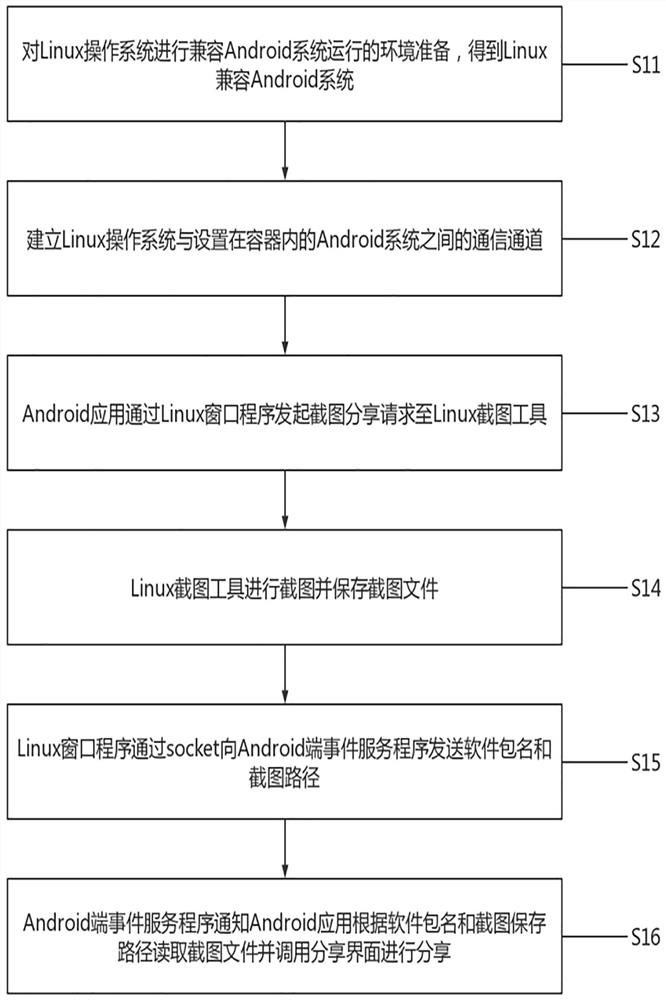
[0039] For ease of understanding, see figure 1 and figure 2 , an embodiment of the method for the Android application provided by the application to call the Linux screenshot tool, including:
[0040]S11, the Linux operating system is prepared to be compatible with the environment of the Android system operation, and the Linux is compatible with the Android system. The Android system includes the Android application and the Android terminal event service program. The Linux operating system includes the Linux window program and the Linux screenshot tool, and the screen display of the Android application In the Linux window program.
[0041] S12. Establish a communication channel between the Linux operating system and the Android system set in the container.
[0042] S13. The Android application initiates a screenshot sharing request to the Linux screenshot tool through the Linux window program.
[0043] S14, the Linux screenshot tool takes a screenshot and saves the screens...
Embodiment 2
[0050] As a further improvement to Example 1, please refer to image 3 , the application provides another embodiment of the method for an Android application to call a Linux screenshot tool, including:
[0051] S21. Use docker to load the Android image on the Linux operating system, so that the Linux operating system and the Android system share the same Linux kernel.
[0052] S22. Start the Android system in the container to obtain a Linux compatible Android system, file intercommunication between the Linux operating system and the Android system, and a data sharing directory.
[0053] S23. Writing and displaying a Linux window program so that each Android application corresponds to a graphics window on the Linux side, and writing an event service program based on Unix domain socker at the Android side, and establishing a socker communication channel between the Linux window program and the event service program.
[0054] S24. Start the Android application and log in, and in...
PUM
 Login to View More
 Abstract
Description
Claims
Application Information
 Login to View More