[0030]The
automation capability provided by the video production system allows the video director to pre-produce a live show (such as a news show or talk show), preview the show in advance of “air time”, and then, with a touch of a button or other trigger, execute the live show. Consequently, a live show or live-to-tape show can be executed more cost efficiently, with greater control over logistics and personnel, with enhanced functionality and transitions, in less time and with less stress, and with fewer people and fewer human errors than was previously possible. The present invention also allows the video director to reuse formats of prior shows by leveraging show templates.
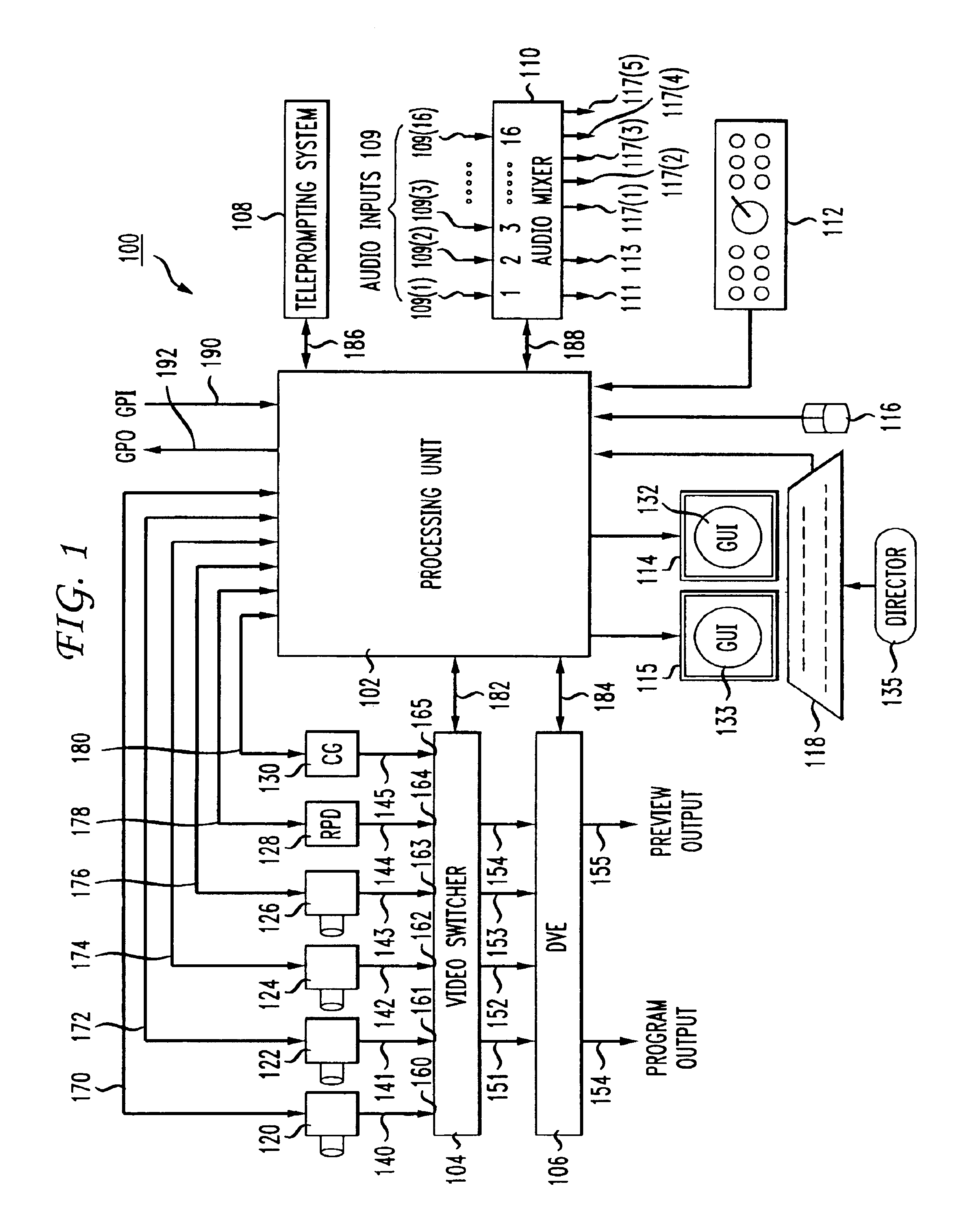
[0033]Upon receiving a video production command, a video production device performs the function corresponding to the received command. In this manner, the
processing unit provides automated control of the video production devices, and thereby provides a system for automating the execution of a show in real time. This feature provides the director with the
advantage of not having to rely on a production crew to execute a show. The cost and time savings this feature provides are therefore substantial. Additionally, the human errors that normally occur during the execution of a show are no longer an issue.
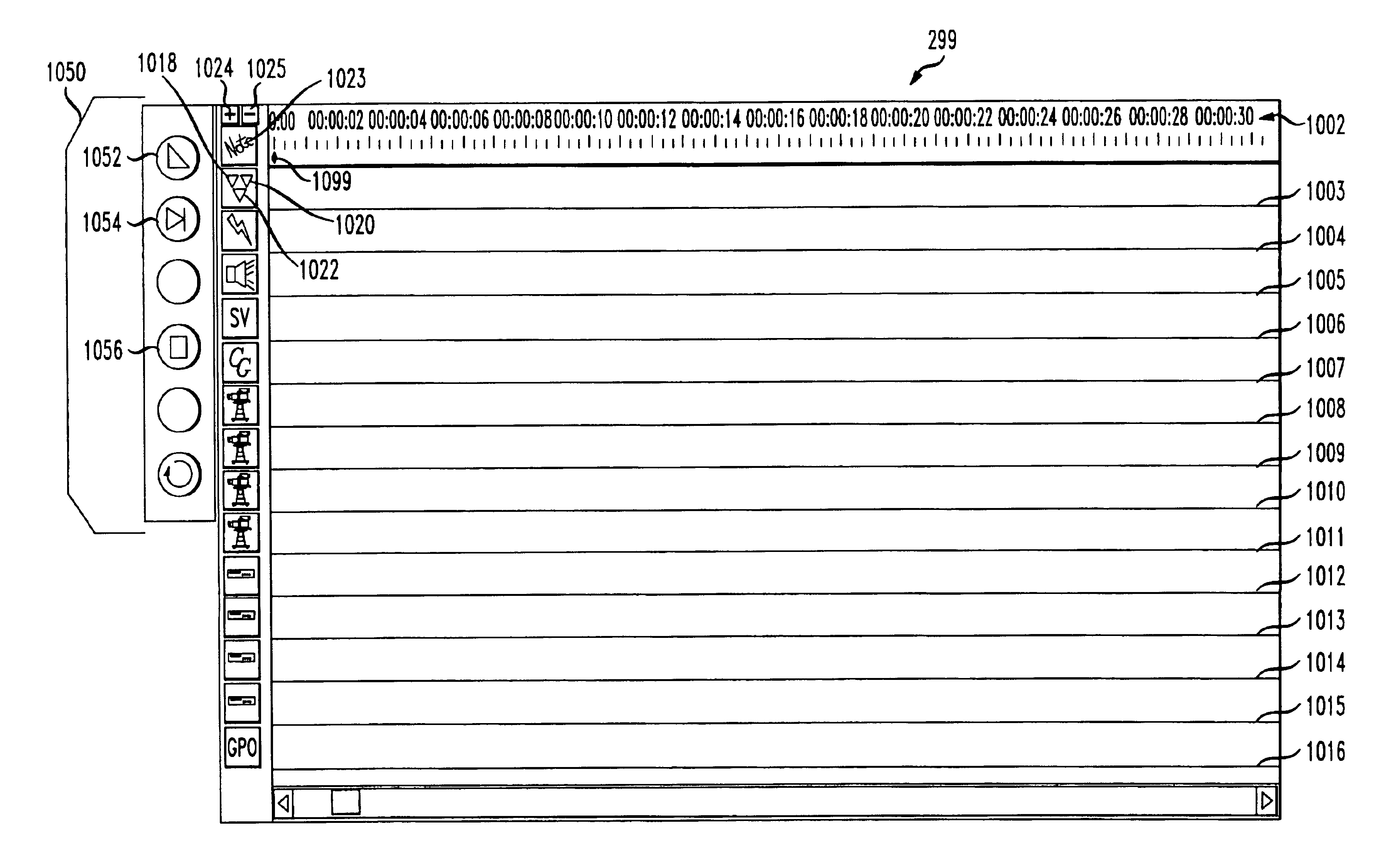
[0040]According to one feature, a transition
macro may be modified while a show is executing. This feature allows a producer to modify the content of a show in real time. For example, it allows the producer to introduce a late breaking news segment or the like into a news broadcast. That is, while the transition
macro is executing, the video director may insert icons or predefined transition macro segments (multiple icons representing a
line item on the director's rundown sheet) into an executing transition macro. Additionally, the director can change icon properties and delete icons and segments.
[0041]Another feature is that a transition macro can be stored as a file and later retrieved and modified. This allows a video director to store “show templates.” A show template is a generic transition macro that can be re-used many times to produce a variety of different shows. By storing show templates, new shows can easily be produced by leveraging a previously created transition macro. The video director recalls the template by file name, makes the necessary modifications as required (according to the new producer / director rundown sheet) and saves the transition macro with a new file name. Leveraging “show templates” can save time, improve quality, and preserve format consistency.
[0042]Advantageously, the present invention provides means for creating a transition macro play-
list. A transition macro play-
list is a
queue of two or more transition macros. The play-
list can be specified as either automatic or manual. If a play-list is automatic, then once a transition macro in the play-list finishes executing, the next transition macro from the play-list is automatically executed. If a transition macro play-list is manual, then once a transition macro in the playlist is executed, the next transition macro in the play-list is loaded and is ready to be executed by the director, such that the director need only activate a
start button to execute the next transition macro. The
advantage of the transition macro play-list feature is that it enables the director to produce a show using multiple transition macros. Consequently, instead of creating one very large transition macro to execute a show, a director can create several small and more manageable transition macros to execute the show.
[0047]Another
advantage of the teleprompting system is that it provides two script
modes: single script mode and multi-script mode. Single script mode is used for general production applications, whereas multi-script mode is better suited for a newsroom application. In the multi-script mode, a script “play-list” is used to import multiple teleprompting scripts, organize them in a desired order, and then play them in that order. Teleprompting scripts are dragged and dropped into the play-list via the mouse. Once the scripts are added to the play-list, they are automatically converted from standard text format to rich text format for display on the teleprompter display screen(s). In addition, the conversion process can also change the
font size and an option for bold or standard can be selected. This feature allows for multiple reporters / writers to develop scripts in parallel and organize them to correlate with the producer / director rundown sheet. In addition, the teleprompting system allow for
ASCII text output through a
serial port to an external
closed captioning encoder for displaying close captioning information on the program transmission.


 Login to View More
  Login to View More